
Demo project
Unified a fragmented IaaS/PaaS/SaaS platform — rebuilt sitemap, design system, and shipped the product’s first mobile app. Won FPT Hackathon.
View Project
UI/UX & Product Designer
Hello, I’m

I studied Translation and Interpretation before moving into design — which is probably why I still treat every product like a language someone has to learn quickly. Translating between two spoken languages and translating complex technical logic into a human interface aren’t so different: both require understanding who’s on the receiving end before you choose your words.
Eight years later, I’m still doing that — across cloud platforms, data tools, food-tech, and F&B operations apps.
Selected work
Each project is an opportunity to solve meaningful problems and create experiences that resonate with people.
Unified a fragmented IaaS/PaaS/SaaS platform — rebuilt sitemap, design system, and shipped the product’s first mobile app. Won FPT Hackathon.
View Project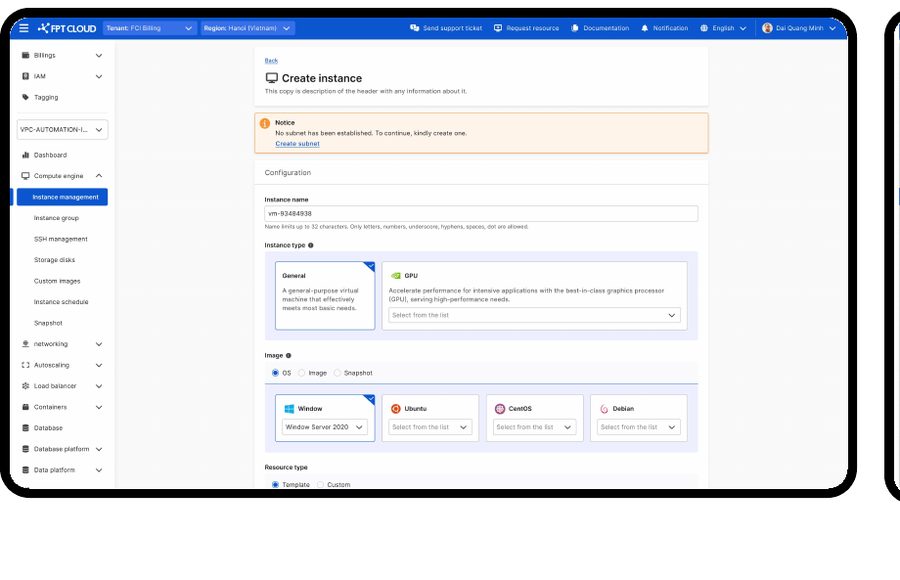
Reworked the UX/UI of an existing cloud server platform on web and mobile for businesses and FPT member companies — as the solo designer, from sitemap to design system.
View Project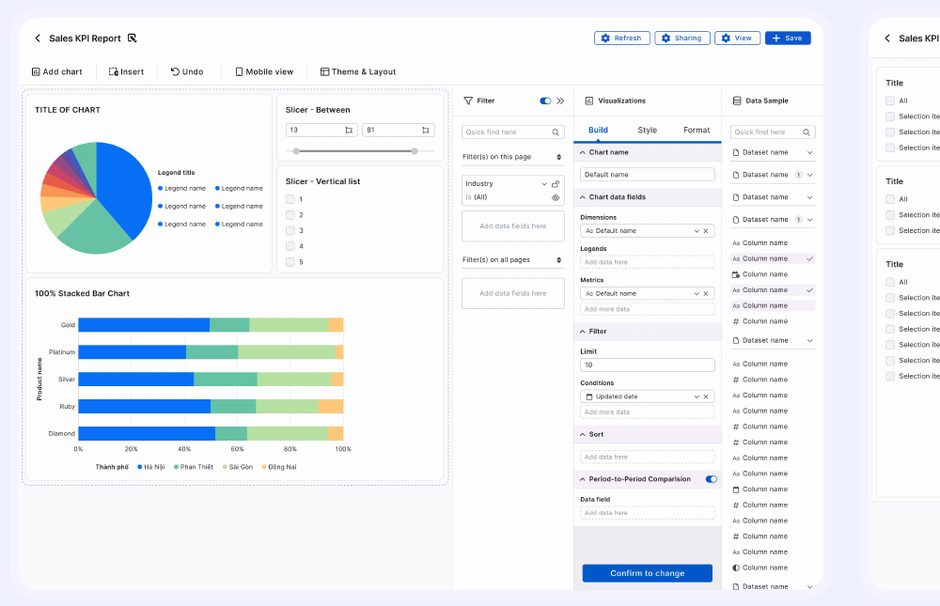
Solo designer on a data visualisation platform built to replace Power BI across FPT Corporation — data modelling, reports and dashboards on web and mobile. Released at FPT Techday 2024.
View Project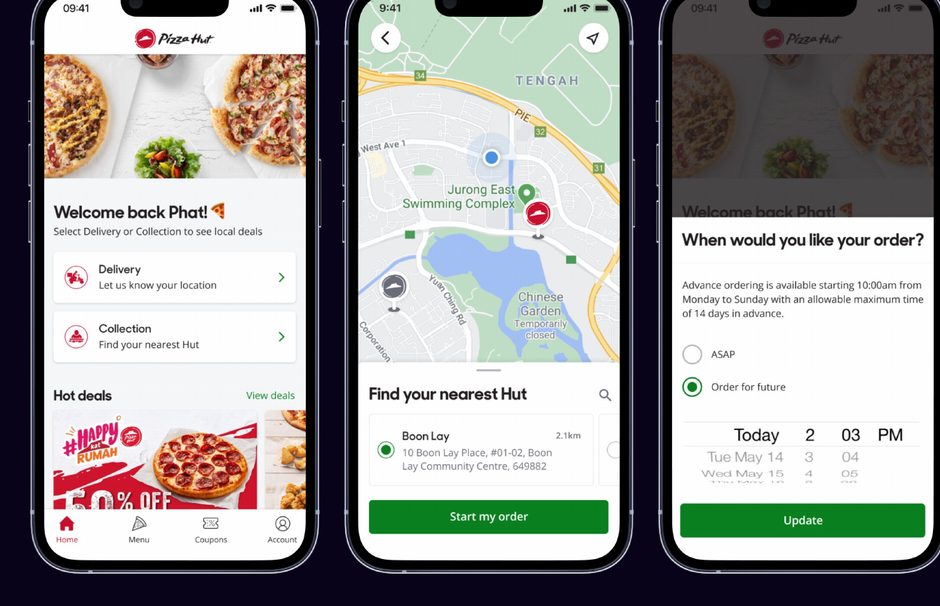
Websites and native apps for Pizza Hut Digital Ventures (Yum! Brands) — from UX research in Asia, sitemaps and user flows to hi-fi mockups and the design system.
View ProjectThoughts & reflections
A space for me to explore ideas, document learnings, and share the quieter moments of the design process.
The longer I work in design, the more I believe that good design begins with paying attention to people.
A Little Corner for Things I Make SlowlyMy favorite things are not always the things I finish quickly.
Color Is a Feeling Before It Is a SystemAs designers, we often talk about color through systems: primary and secondary palettes, semantic colors, contrast ratios, and accessibility guidelines.
Crochet and the Art of Starting OverThere is a particular kind of patience that crochet teaches you. When a stitch goes wrong, you can pretend not to notice and keep going.
What I do
A versatile skillset built through curiosity, practice, and a genuine love for learning.
All projects
From outsourced F&B apps to enterprise cloud platforms — each project taught me a different way to be careful.
Unified a fragmented IaaS/PaaS/SaaS platform — rebuilt sitemap, design system, and shipped the product’s first mobile app. Won FPT Hackathon.
View ProjectReworked the UX/UI of an existing cloud server platform on web and mobile for businesses and FPT member companies — as the solo designer, from sitemap to design system.
View ProjectSolo designer on a data visualisation platform built to replace Power BI across FPT Corporation — data modelling, reports and dashboards on web and mobile. Released at FPT Techday 2024.
View ProjectWebsites and native apps for Pizza Hut Digital Ventures (Yum! Brands) — from UX research in Asia, sitemaps and user flows to hi-fi mockups and the design system.
View Project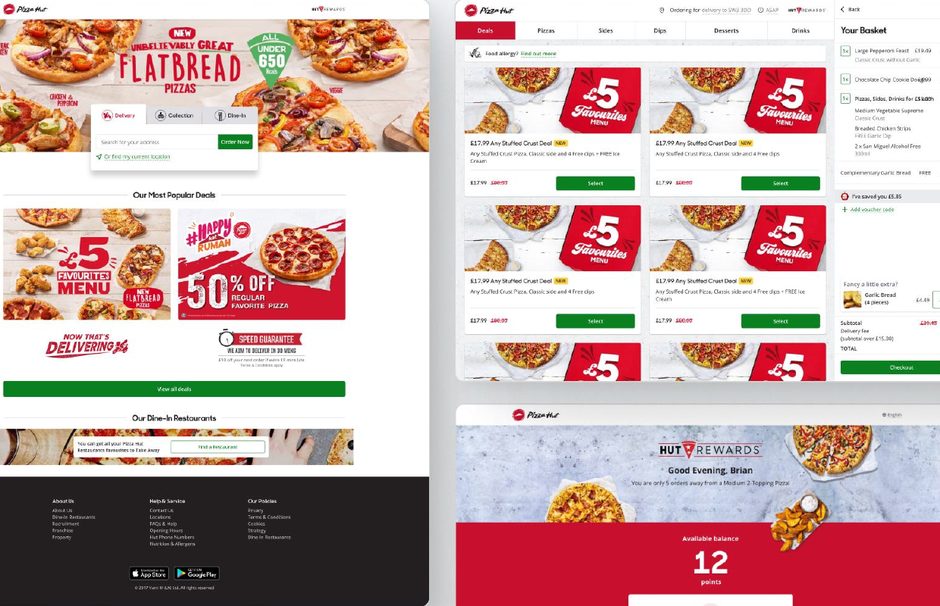
Web and mobile ordering apps where customers build a pizza to their taste, earn points and redeem vouchers — designed on the brand guideline with a shared UI library.
View Project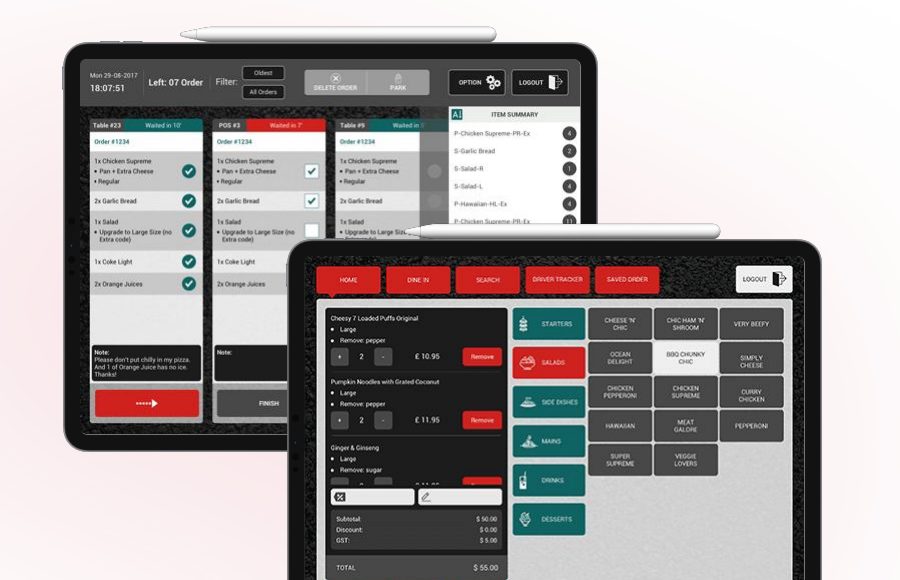
Restaurant operations suite for Pizza Hut Indonesia — Kitchen Display, POS, Dine-in and Driver apps on tablet and mobile, with touch-friendly layouts and real-time updates between apps.
View ProjectProduct Design · 2022 – 2024
A cloud-services platform built feature by feature, by different teams, over many years — until nothing felt like it belonged together.
FCI SmartCloud provides IaaS, PaaS, and SaaS services to help businesses of all sizes modernize their operations. When I joined, the product had grown organically — each feature was built separately, components weren’t shared, and the experience felt inconsistent across every screen.
The goal wasn’t to redesign the surface. The goal was to rebuild the foundation: understand what actually existed, establish the system underneath, and then make the product feel like one thing.
My first move wasn’t a redesign — it was rebuilding the sitemap and user flow against what actually existed, so any decision after that was grounded in the real product, not the documentation of it.
I was the lead product designer working closely with product managers and engineering leads across two product tracks simultaneously.
My Role
System architecture, design system, UX research, mobile app design, Figma ownership.
Product
Roadmap, stakeholder alignment, feature prioritization.
Engineering
Component implementation, design system integration, technical constraints.
Engineering
API design, service logic, platform infrastructure.
QA
Test planning, design review for edge cases and error states.
Stakeholder
Business direction, Hackathon sponsor, final approval.
The platform served two distinct user types with very different needs and technical literacy levels.
Technical users managing cloud resources, provisioning services, and monitoring infrastructure. They need control, precision, and fast access to system status.
Non-technical managers evaluating cloud adoption. They need clarity on what the platform does and trust that it’s reliable — without reading a manual.
Engineers deploying and managing applications on the platform. They value efficiency, good error messaging, and predictable behavior.
Users who needed to monitor and manage their cloud resources on the go — the audience for the first mobile app I designed for this product.
The business needed the product to feel enterprise-grade. The users needed it to feel usable. Those two goals were more aligned than the existing product suggested.
Before I joined, each feature had been built in isolation. The components used on the product were not always consistent — some screens used different button styles, spacing tokens, and navigation patterns for the same interaction. There was no shared sitemap that accurately reflected the live product.
We couldn’t stop shipping to refactor everything. The design system had to be built incrementally, replacing components as features were updated — not as a big-bang redesign.
I audited the live product, not the documentation. Every screen, every flow, every component — mapped to understand what actually existed before deciding what to change.
Pain point #1 — Navigation
Users couldn’t predict where features lived. The navigation had grown without a consistent information architecture, so mental models broke across sections.
Pain point #2 — Inconsistent components
The same action — e.g., confirming a deletion — triggered different modal patterns depending on which part of the product the user was in.
Pain point #3 — No mobile access
Users who needed to check service status or respond to alerts on the go had no mobile option — they relied entirely on desktop.
Pain point #4 — Error state confusion
Error messages were technical and often untranslated for non-developer users, leaving business decision-makers unable to self-resolve issues.
1st
Native mobile app in the product’s history, shipped for iOS and Android.
Won the FPT Corporation Hackathon with the redesigned platform.
2yr
From the first audit to a design system the product now runs on.
I conducted interviews with 8 internal users (IT admins, developers, and one business manager) and reviewed support tickets to identify recurring friction patterns.
Finding 01 — Navigation mental model
Users grouped features by service type (compute, storage, networking), but the navigation was grouped by when features were built. The two didn’t match.
Finding 02 — Trust in error states
Non-technical users skipped error modals entirely when they didn’t understand them — they called support instead. Error copy was an invisible UX problem.
Finding 03 — Mobile monitoring behavior
3 out of 8 users said they checked service health via Slack notifications because there was no mobile view — a workaround that masked the gap in the product.
Finding 04 — De-biasing moment
I assumed denser information on the dashboard would feel more “powerful” to enterprise users. Testing showed the opposite: simpler layouts got faster task completion. I adapted the design to the simpler version.
The project was scoped into two phases: foundation (design system + IA) and expansion (mobile app + new features).
| User story | Scope | Priority | Status |
|---|---|---|---|
| As an IT admin, I want consistent navigation so I can find features without guessing | IA Rebuild + Nav Component | High | Done |
| As a developer, I want error messages that tell me what to do next, not just what went wrong | Error state redesign + copy | High | Done |
| As a business manager, I want a dashboard I can understand at a glance without technical knowledge | Dashboard redesign | High | Done |
| As a user on the go, I want to check service status and respond to alerts from my phone | Mobile App (iOS + Android) | Medium | Done |
| As a future designer, I want a design system I can extend without breaking what’s there | Design System Tokens + Docs | Medium | Done |
| As an admin, I want bulk actions on resources so I don’t repeat the same operation 20 times | Bulk action patterns | Low | In Progress |
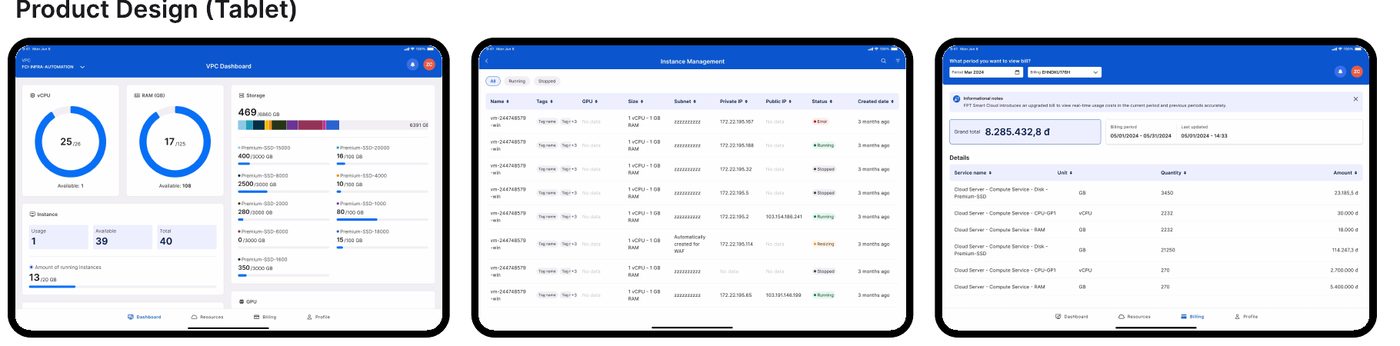
Selected screens from the redesigned platform.
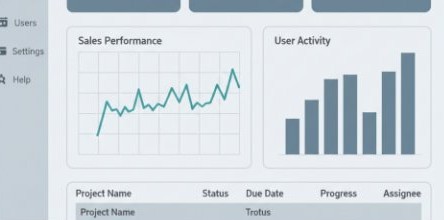
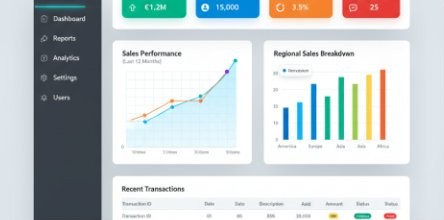
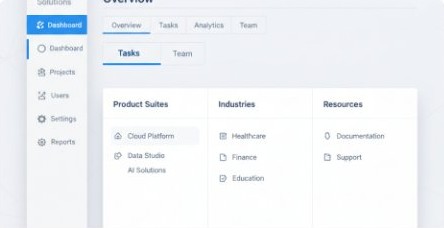
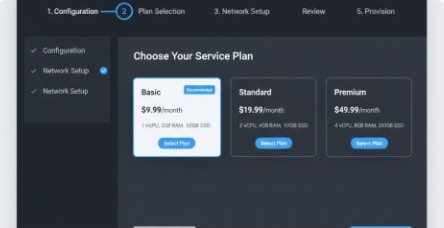
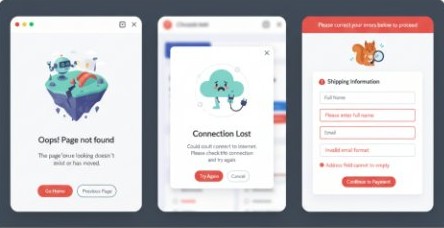
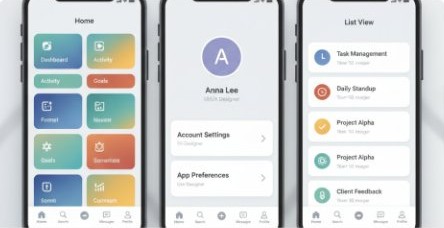
The full set of screens lives in the Figma prototype.
The redesign delivered a unified product experience across web and mobile — the first time SmartCloud felt like a single platform rather than a collection of features.
The work that mattered most wasn’t the final screens — it was the system underneath them. Every feature after this point had a foundation to build on.
Product Design · 2023 – 2024
Improving the UX/UI of an existing cloud platform for domestic businesses, FPT member companies and the FPT group.
FPT Cloud Server provides a secure and reliable virtual server system, designed centrally for easy scalability. Users can create and configure compute instances with minimal operations, and control the system through the web, CLI and API. Each compute component can be configured separately: processor, storage, networking, operating system and charging method.
Instances resize automatically according to workload and usage needs.
FPT Cloud’s cloud server is committed to stability, with up to 99.99% uptime.
A built-in Standard Firewall L4, plus firewall options from major security firms.
Load sharing across virtual servers improves performance, availability and scalability.
I was the only designer on the product, working closely with the Product Owner team in an Agile process (Jira and Microsoft 365).
We analysed user feedback collected by the sales teams and ran internal surveys to find the critical pain points and the areas to improve. From there, the Product Owner and I agreed on three key insights:
Insight 01
A consistent design system is needed across web and mobile.
Insight 02
Complex cloud management tasks need intuitive navigation and user flows.
Insight 03
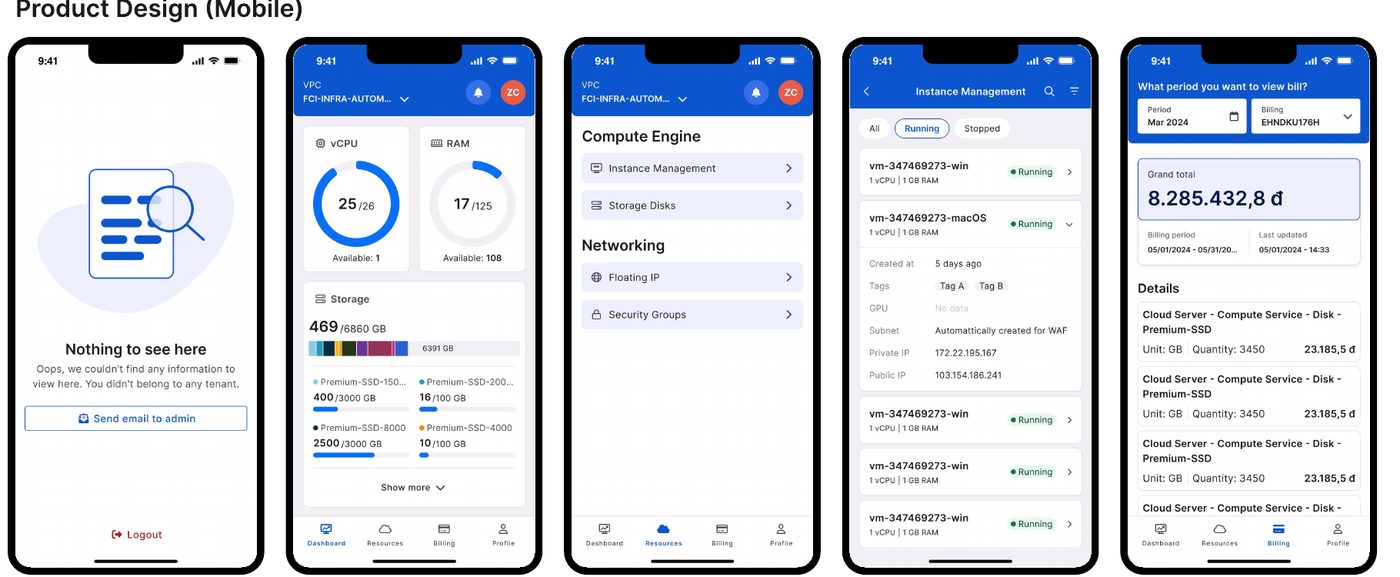
On mobile, users need easy monitoring and quick access to critical information.
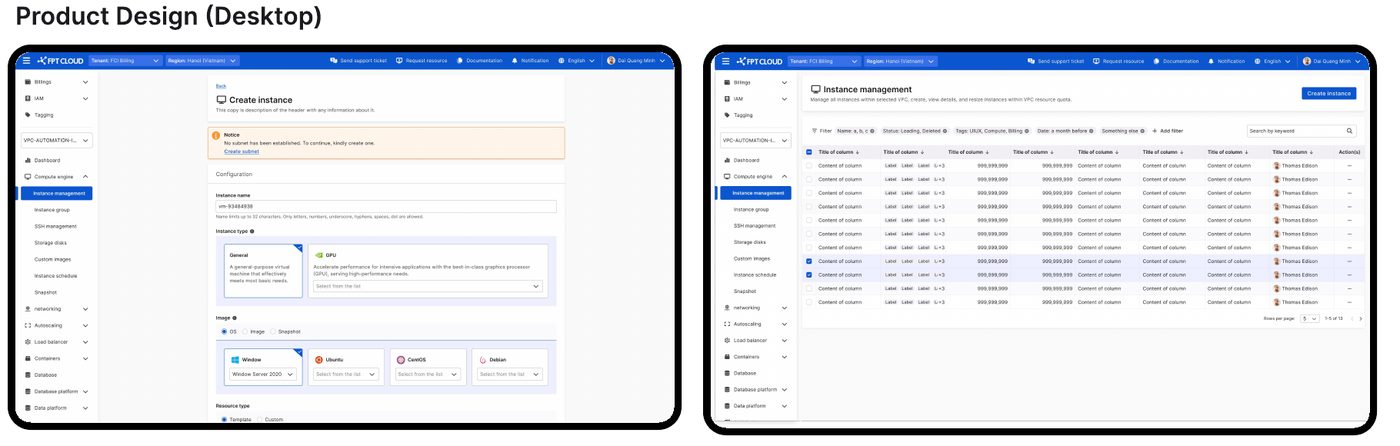
With the research done, we built new wireframes and user flows for the web and mobile app, focusing on navigation, resource management and data visualisation.
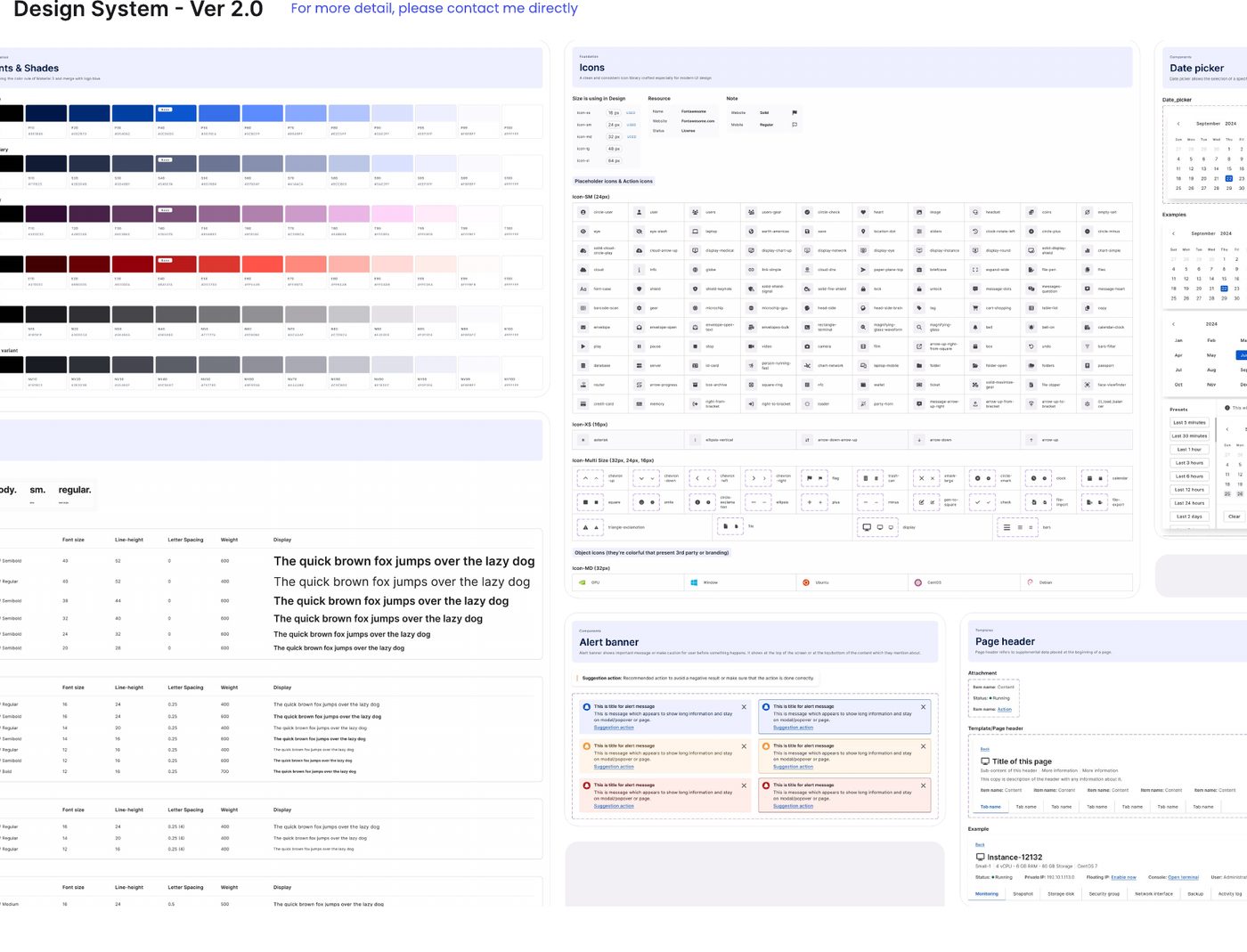
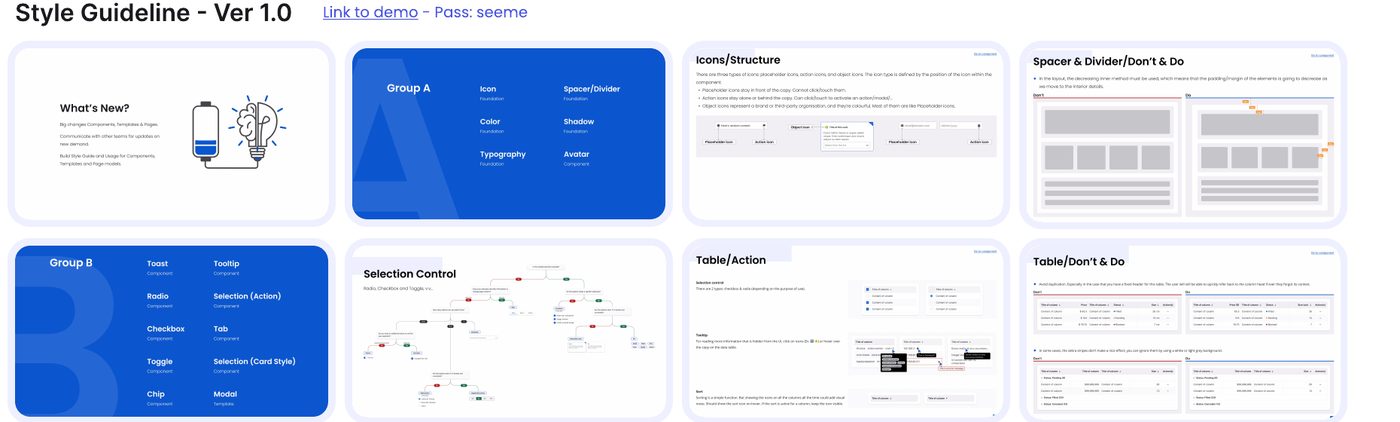
Building on the research, the competitive analysis and the user flows, I created the design system and style guide that keep every product module consistent.
| Challenge | Solution |
|---|---|
| Redesigning an active product without disrupting current users | A phased redesign, prioritising critical features based on user feedback |
| Creating a cohesive experience across complex modules (IAM, Billing, Compute Engine and more) | A robust design system that keeps every module consistent |
| Balancing full functionality for IT professionals with ease of use for managers on mobile | Separate user flows for technical and management users, each optimised for their needs |
I focused on intuitive interfaces for complex cloud management tasks, serving both technical IT staff and upper management. The mobile app is built for quick notifications, easy monitoring of virtual machines and a simple billing overview.
I worked with the development teams to make sure every design improvement was feasible within the existing system architecture, and designed with scalability in mind so new features can be added without hurting the experience.
The project is in the planning and bug-fixing stage, with a roadmap for gradual UX/UI improvements. I created a full plan for rebuilding the design system and component library, to keep the product consistent and reduce hardcoded elements.
This project shows how I approach complex design challenges in enterprise cloud services: building a design system, balancing technical requirements with user needs, and improving a live product without disrupting the people who use it every day.
Product Design · 2022 – 2023
A data visualisation platform for financial and accounting work across FPT Corporation, built to stand alongside and eventually replace Power BI.
My team’s goal was a complete data visualisation solution, comparable to Power BI, to support financial and accounting work across FPT Corporation and eventually replace Power BI. The need sounded simple, but meeting it meant the PO and BA team kept reviewing Power BI’s features, picking the ones that truly mattered to the business and its subsidiaries, and researching how competitors handle big data and data security.
I was the only designer on the product, working with the PO team in an Agile process (Jira and Microsoft 365).
With the Product Owner’s support, I collected Power BI’s functional analytics and user needs, so I could look at the product’s UX objectively. From there, we agreed on three key insights:
Insight 01
A secure, multi-level data access system is essential.
Insight 02
Data modelling and visualisation tools have to be intuitive.
Insight 03
The product has to work across web and mobile.
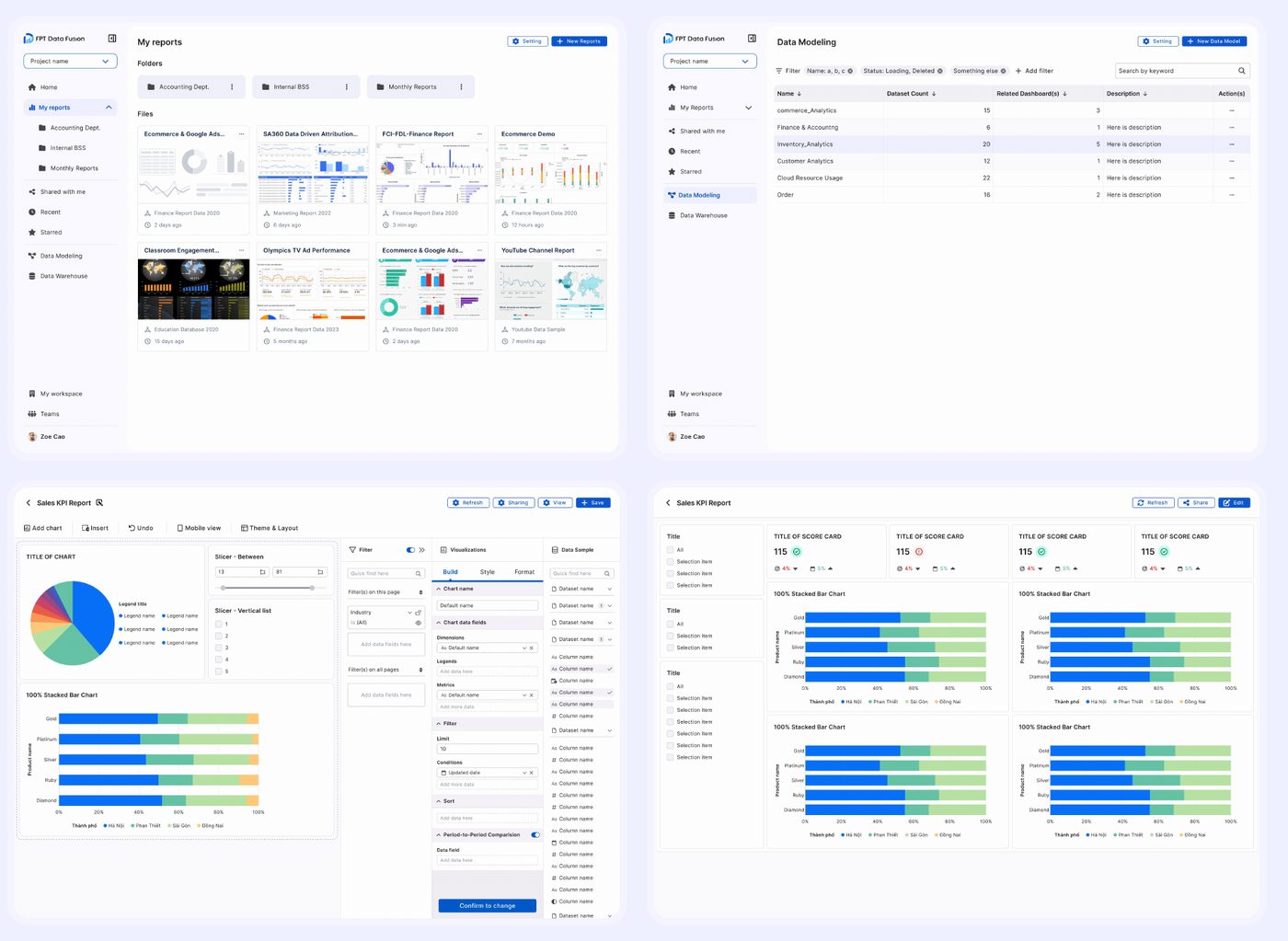
After working through the needs with the team, we completed the core user flows for the first features, then started wireframes and user flows for web and mobile, with the focus on data modelling, visualisation and account administration.
Finally, we built a complete design system and high-fidelity prototypes, and refined them with stakeholder feedback and A/B testing until the result worked as well as it could for the end user.
| Challenge | Solution |
|---|---|
| Designing an intuitive interface for complex data modelling and visualisation | A step-by-step data modelling process with clear visual cues |
| Creating a secure, multi-level permission system without hurting the user experience | A granular permission system with intuitive controls |
| Keeping web and mobile consistent | A flexible design system that adapts to both web and mobile interfaces |
Throughout the roadmap, we aimed for data displays that are easy to understand and pleasant to look at, so people can get insights quickly and make informed decisions. Data Suite is tailored to different roles within FPT, each with its own level of data access and analysis needs.
The engineering team made sure the architecture supported many ways of entering data and connecting databases, and worked with us to verify that real-time updates and cross-platform sync were feasible.
When I moved to another project in March 2023, Data Suite was still a proof of concept, with selected FPT member companies trying the platform and running A/B tests to refine the experience. By FPT Techday in November 2024, the product had been released to end users and was in its marketing campaign.
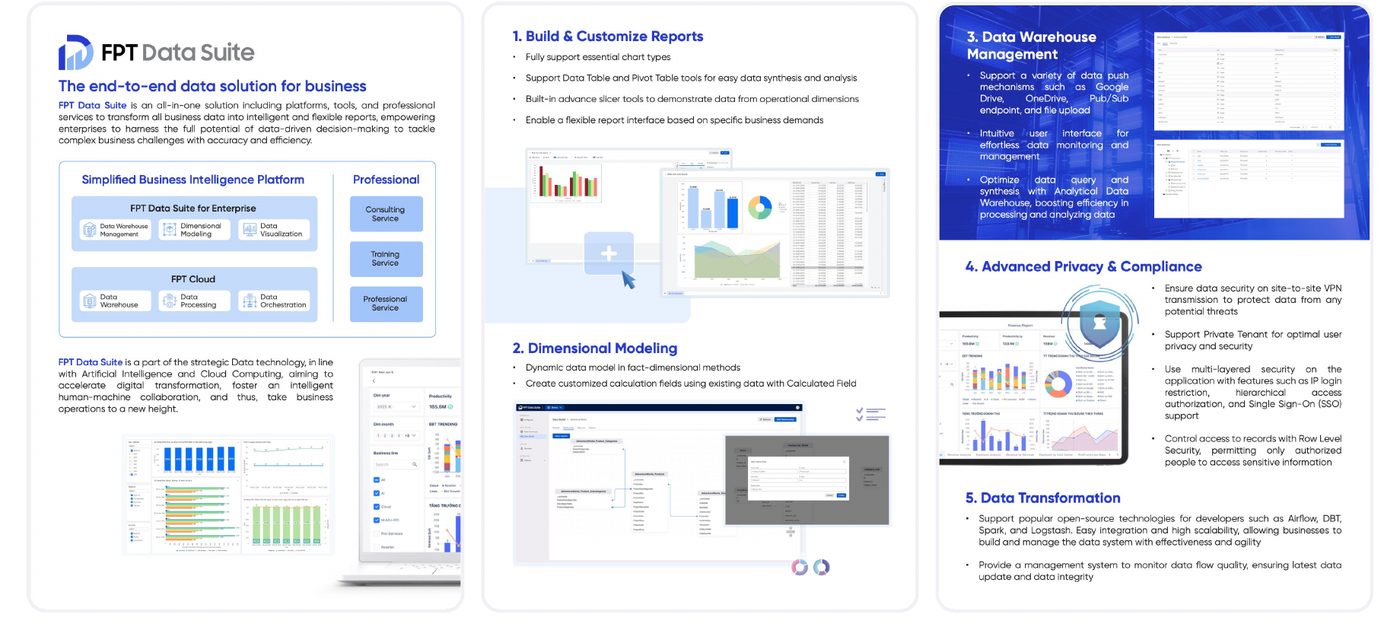
This project shows my work on complex data visualisation tools: balancing user needs with strict security requirements, building a full design system and adapting it for web and mobile.
UX/UI Design · 2018 – 2022
Websites and native apps for Pizza Hut Digital Ventures, helping Pizza Hut grow as a digital franchisor.
Pizza Hut Digital Ventures (formerly Pizza Hut Digital & Technology) is a digital brand owned by Pizza Hut, part of Yum! Brands. I’m proud to have been part of PHDV’s work on a world-class digital platform (web, iOS and Android), helping Pizza Hut grow as a digital franchisor through data-driven technology, thought partnership and a people-first culture, and giving the best ordering experience to everyone who enjoys the Pizza Hut menu.
At PHDV, I designed and improved websites and mobile apps, and partnered with other teams to build the core design system. My goal was to grow my product design knowledge across the whole product development cycle.
The product team had 100–150 people: design, UX research, web and mobile development, product managers and more, working in Agile with Jira and Monday.
In my first month, I spent a lot of time talking with the design team. Before, I had worked with one teammate and handled most of the team’s tasks; here I had international colleagues with many years of experience. I started learning standard product processes and took on specific website and app features under the direction of the Team Leader.
Pizza Hut’s sales growth had slowed, while competitors such as Domino’s grew their digital offering. After a $130 million investment from parent company Yum! Brands, Pizza Hut Digital Ventures (now Pizza Hut Digital & Technology) was set up in 2017 to use digital technology to improve the customer experience: online payment, delivery and takeaway ordering, and loyalty programmes.
Problem 01
Sales growth dropped significantly.
Problem 02
Pizza Hut had fallen behind Domino’s and other pizza franchise competitors.
Problem 03
Placing orders and customising items was difficult.
Problem 04
Paying in person was inconvenient.
PHDT had a clear mission and a focused product vision: one core, creative e-commerce platform, with websites and native apps for every franchise market, that gives customers an outstanding experience and makes ordering and delivery more efficient and cost-effective.
“Delivering Digital & Technology Excellence for Our Customers, Team Members, and Franchisees.”
Customers can order their favourite pizzas from anywhere, at any time.
Simple delivery choices and scheduling, such as “ASAP” or “schedule for later”.
An easy online menu to browse and customise orders: toppings, crusts and sides.
A user-friendly cart to manage the order, and quick, secure online payment.
Schedule an order for later and follow its progress in real time.
A loyalty programme that rewards every online order with points for discounts, free pizzas and special offers.
After discovering and empathising, we moved to defining. The team ran usability tests with two people who matched our core audience segments: we showed them the current Pizza Hut website and asked them to order a pizza with one method, delivery or pickup. The test results showed the main difficulties:
Delivery
Customers struggled to check which items were available on the menu and to customise their order.
Pickup
Customers had trouble collecting their order at the store, because of how the order and customer details were checked.
The design team in Vietnam mapped the first customer journey in Q1 2019.
In the second round of research (Q4 2019), the UX researchers at PHDV UK ran user research and a survey with 31 participants across Japan. Synthesising the results with them and with the business strategy, we found three main age groups:
26%
Career-focused customers who order pizza for quick meals, drawn by the variety of flavours, toppings, sides and home delivery.
26%
Established professionals and managers who value deals and combos for family meals and social gatherings.
13%
Senior professionals and entrepreneurs who choose deals and combos for company meetings and social occasions.
Competitive research was an essential part of the define stage. By analysing the features and solutions across the market, we saw where Pizza Hut stood, which services were basic and which were complete, and the strengths and weaknesses of our competitors. This helped us define our value proposition and find where the product could stand out.
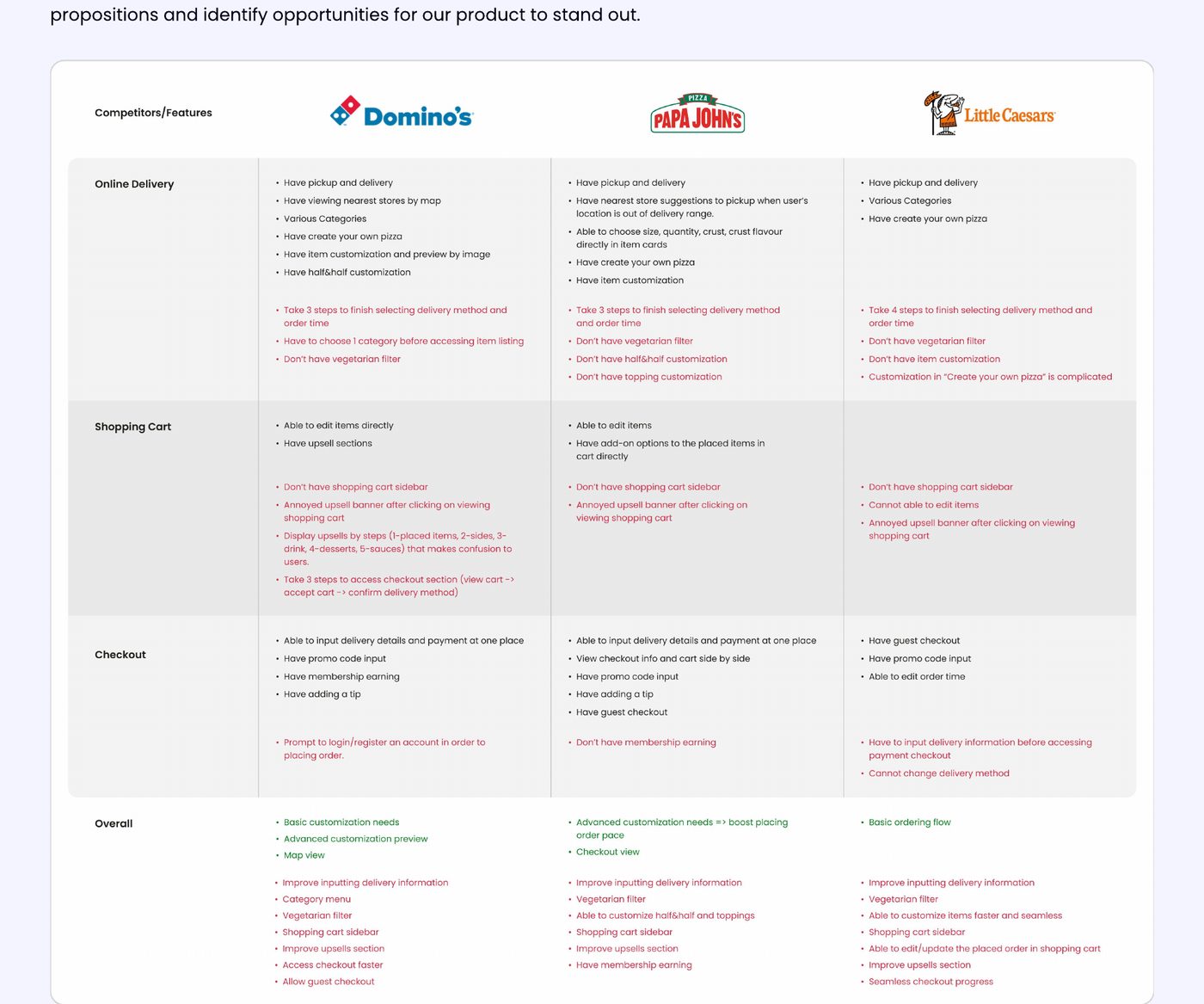
The sitemap and user flow showed the whole journey of a user in the app, from placing an order to checkout. They helped us find opportunities to improve the experience, and gave designers, product managers and developers a shared picture of how the proposed solution was structured.
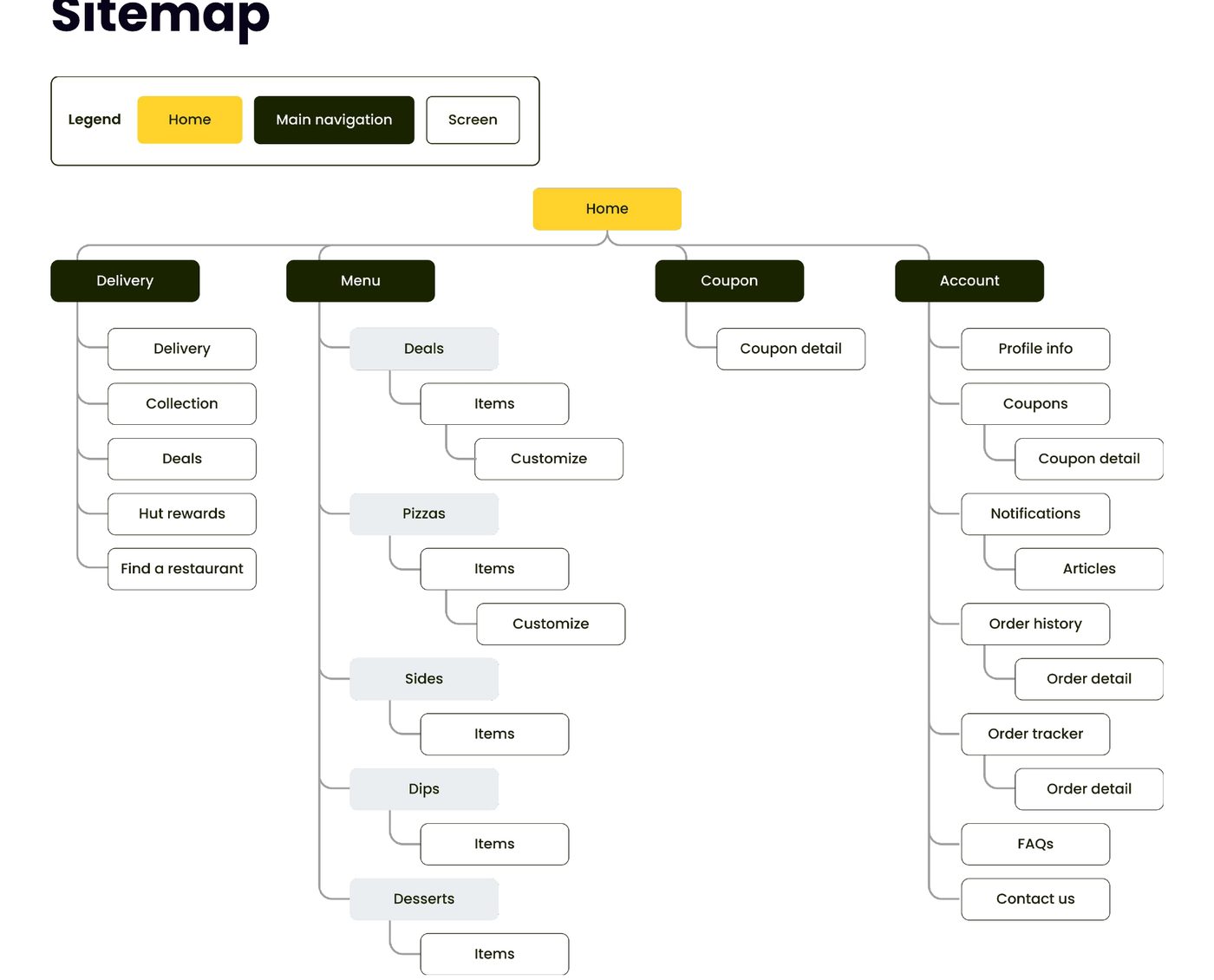
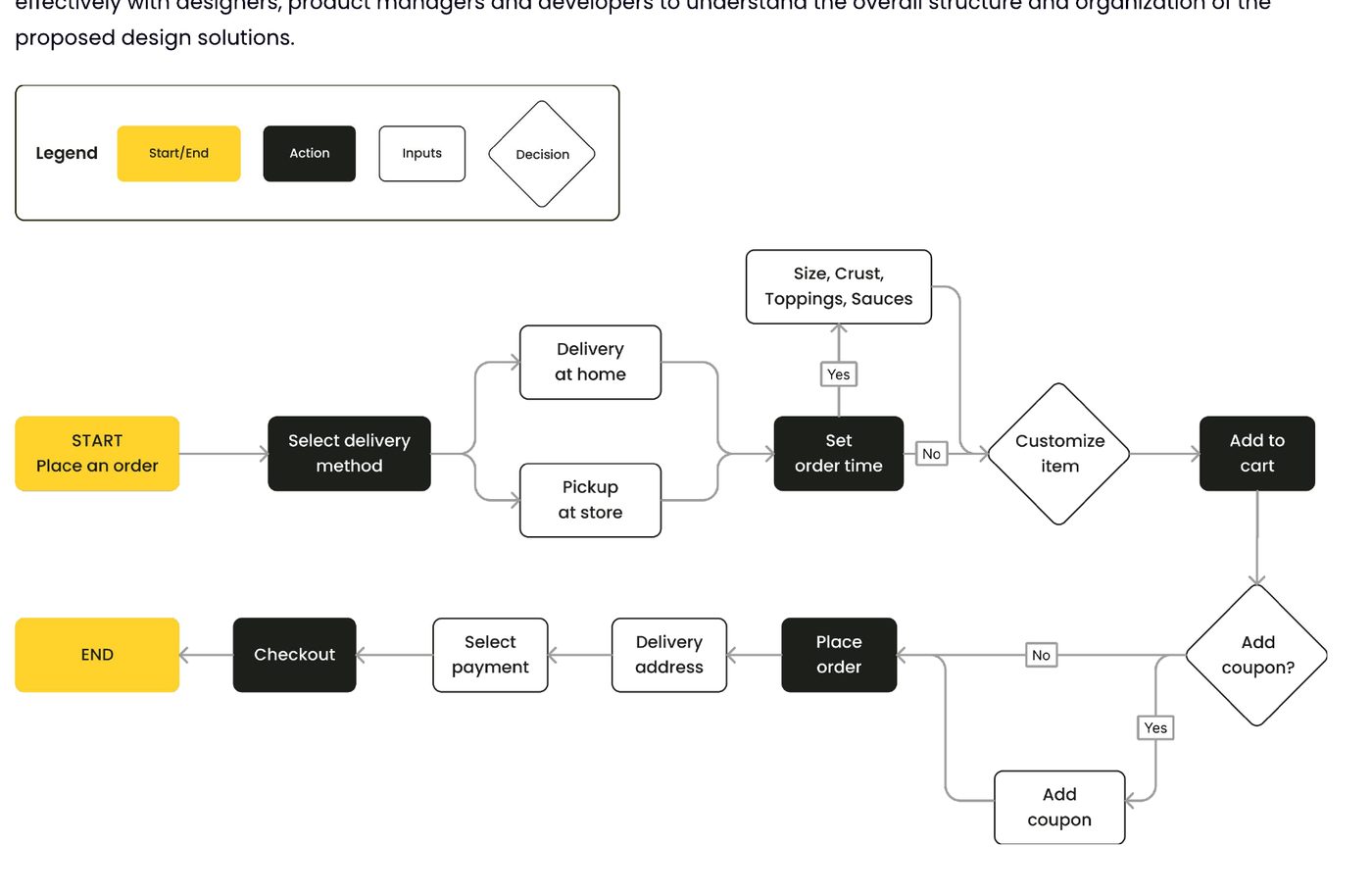
In 2020, as the company grew fast, the design team expanded across the UK, the US and Vietnam. It was an exciting chance to build the second version together with product designers and UX researchers around the world.
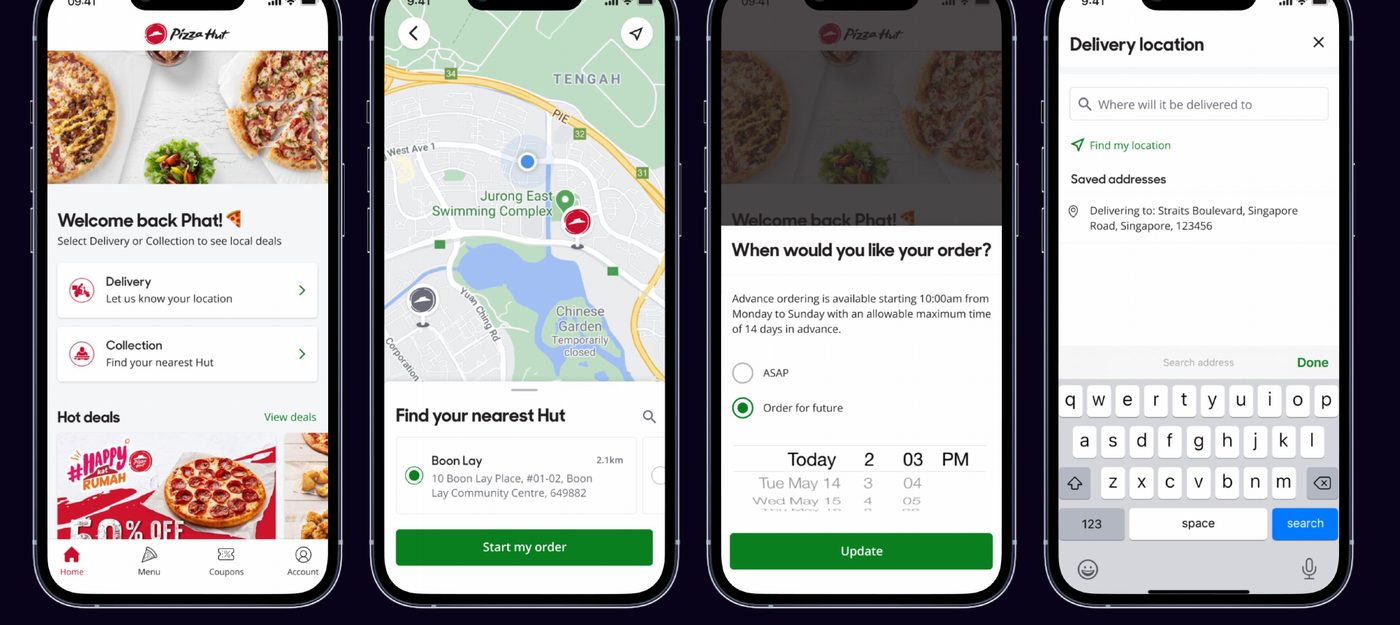
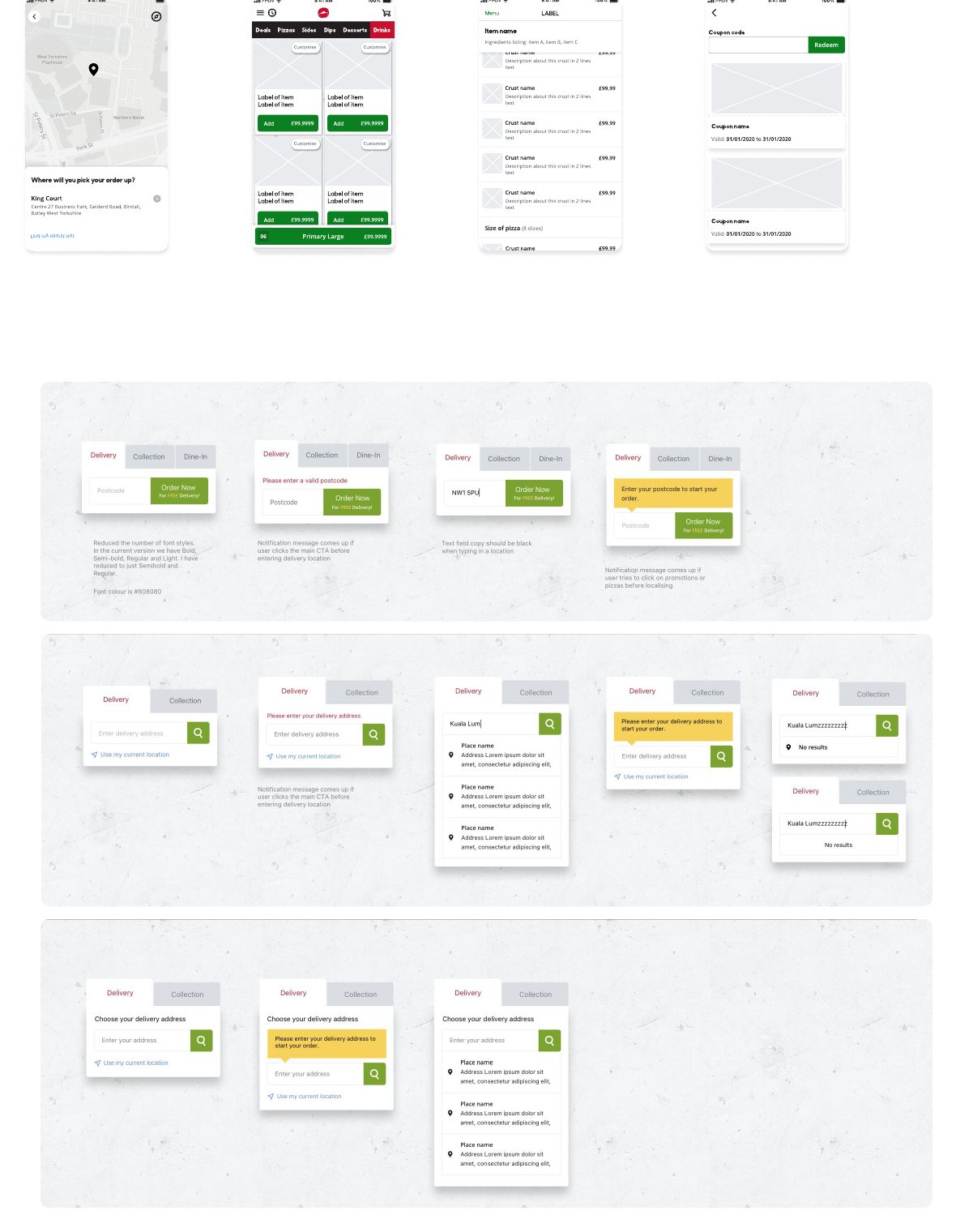
The app supports delivery and pickup. Pickup users find nearby stores on a map, by typing a location or using their phone’s location. Delivery users enter their address by postcode or street address, then choose a preferred delivery time.
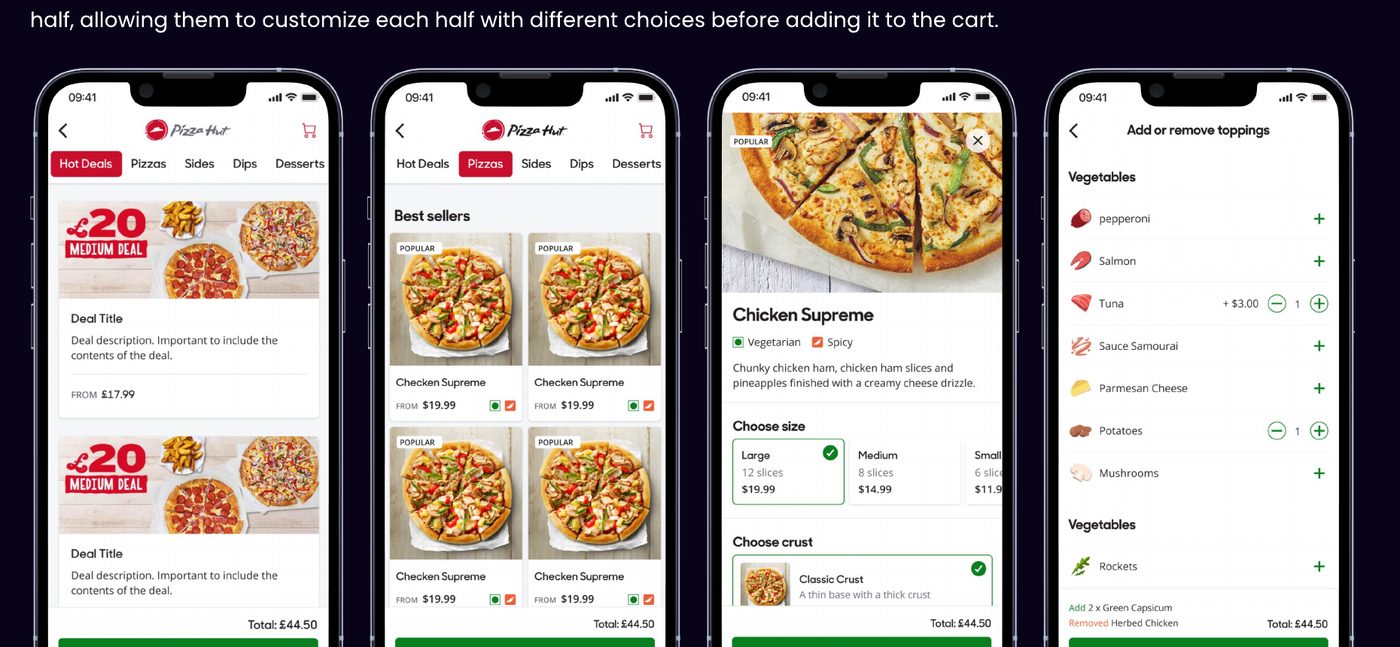
The menu has six categories: deals, pizzas, sides, dips, desserts and drinks. Users customise a pizza by size, crust, sauce, cheese and toppings: they can create their own pizza, pick any four toppings, or go half and half with different choices on each half before adding it to the cart.
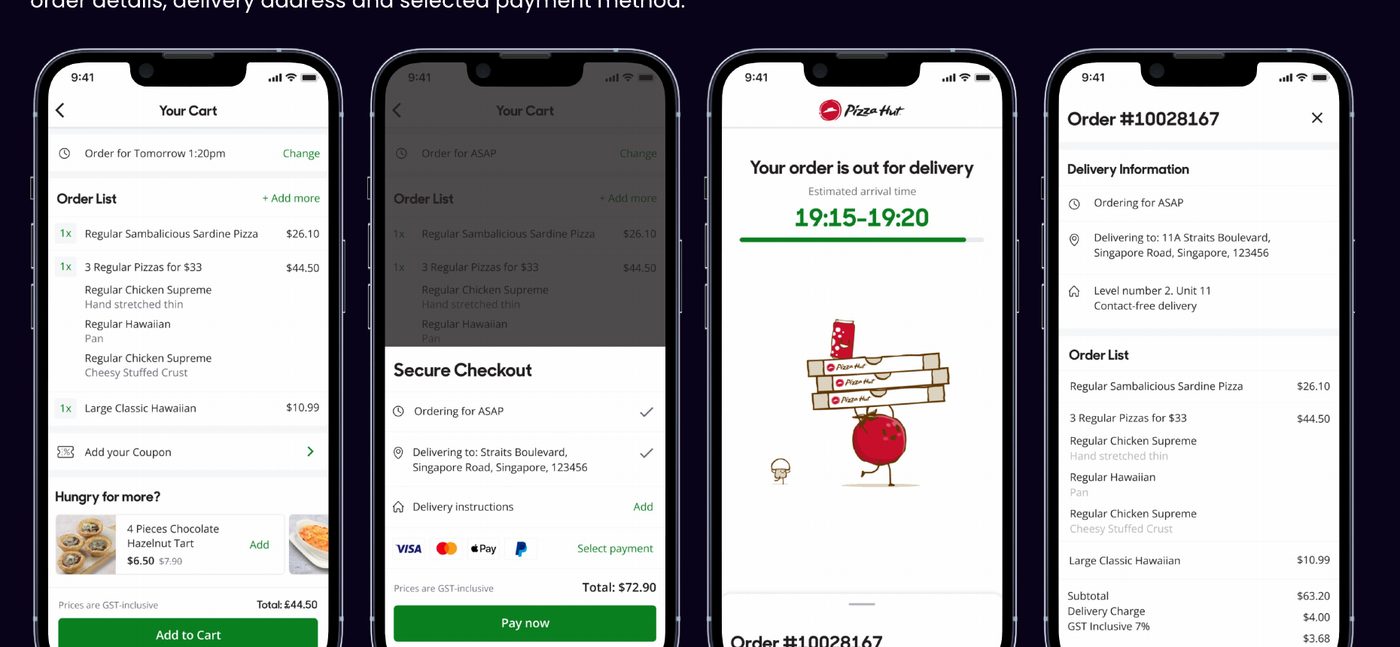
In the cart, users manage the order time, delivery address and items, and can add coupons and suggested extras. At checkout, they enter the recipient’s details, choose a payment method, and can register to join the loyalty programme. After the order is placed, a confirmation screen shows order tracking, estimated delivery time, order details, address and payment method.
Pizza Hut Digital & Technology was a great chance to go deep into digital product design, where creative design and technology come together to build products that give customers a seamless experience and keep them engaged. It also let me work cross-functionally and support the whole product development process.
UI & Graphic Design · 2017 – 2018
An app that lets customers order pizza from their phone, earn points, redeem vouchers and customise their pizza to taste.
Customers can easily buy pizza from their phones with this app. Besides earning points and redeeming vouchers, its biggest advantage is letting customers customise their pizza to the flavours they like.
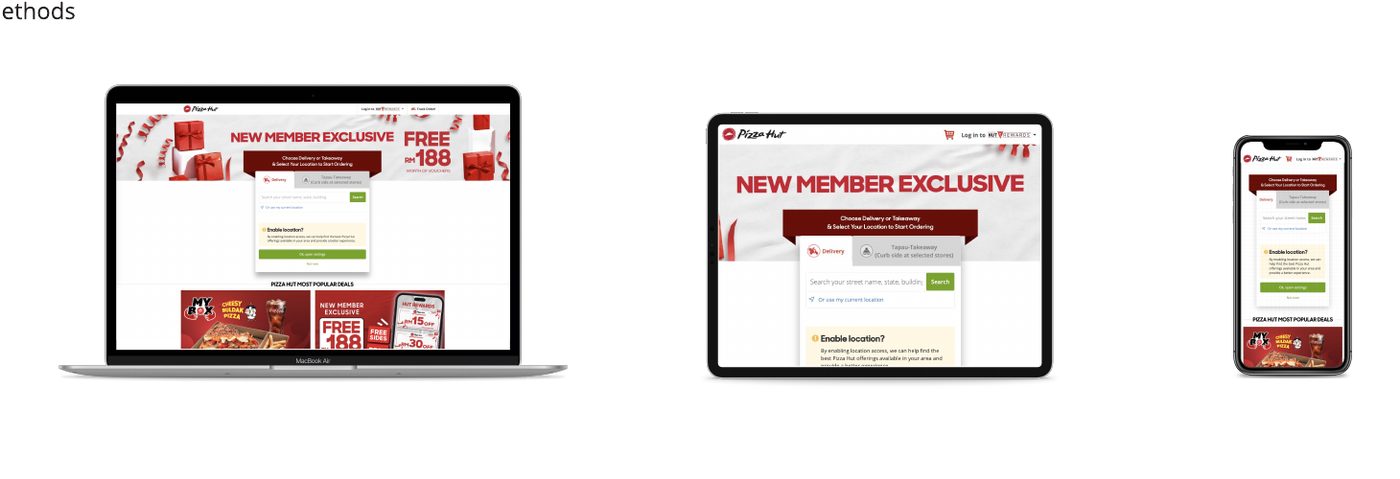
As UX/UI Designer and Graphic Assistant, I designed 50% of the app’s foundation on my own: login and logout, account, home page and the ordering flow. Later, a second designer joined me for the go-live in Japan, where we added image processing for the menu database and redesigned the menu page for that market.
Step 01
A guideline closer to branding than to web design.
Step 02
To focus on the user experience.
Step 03
And send it to the PM for A/B testing.
Step 04
One that suits digital products.
Step 05
The people who decide what each feature is for.
FCD (Fast Casual Delivery & Carry Out) is Pizza Hut’s store format for delivery and carry-out, and the model it uses to enter new markets. It improves the customer experience with technology such as contactless delivery and pick-up.
Our team’s job was to bring this product to market exactly as the FCDS Style Guideline, created by the UK team, describes.
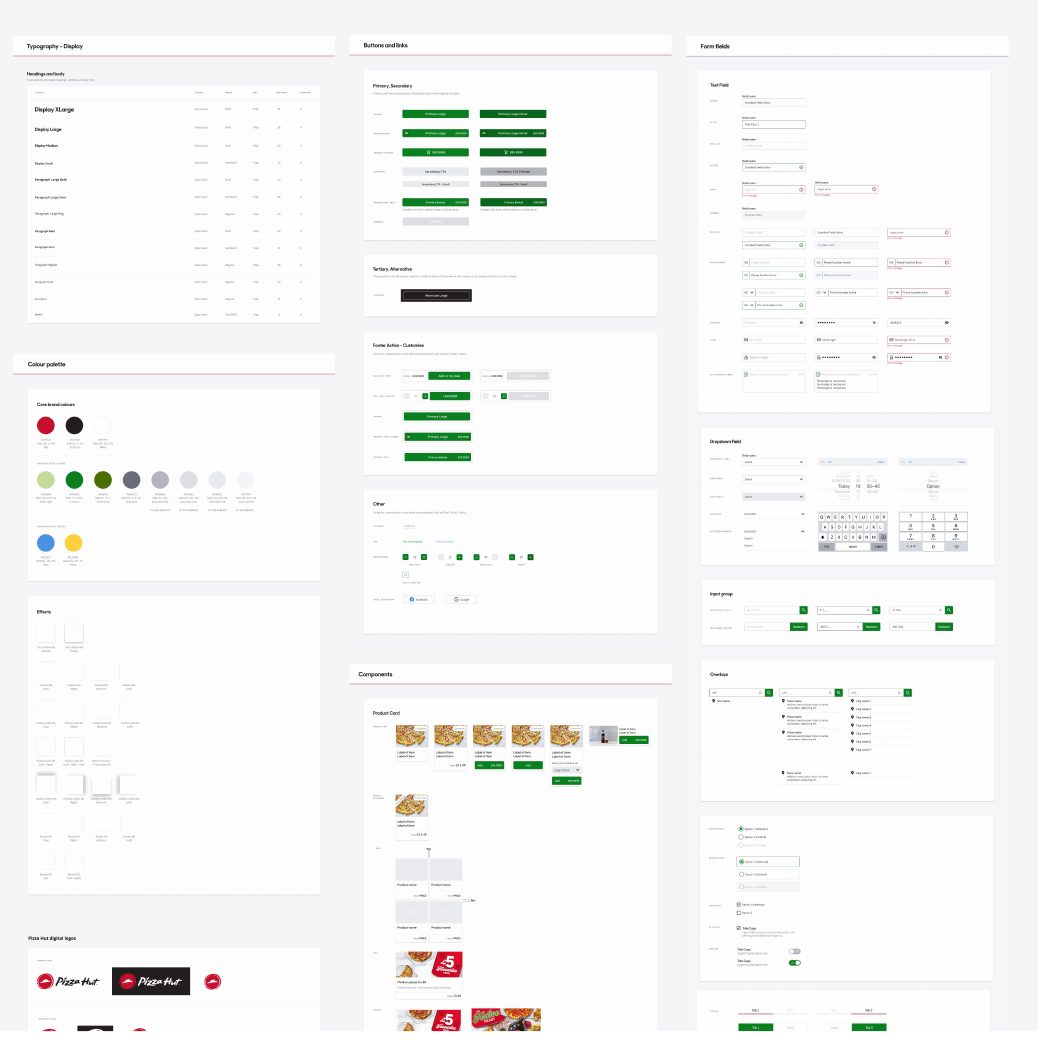
The UK team built the web app as a template for other markets. For each market, the Project Manager collected requirements directly from that market and delivered features comparable to the UK site, adapted to local differences, especially in disposition and menu. The mobile app design was rolled out at the same time.
The user flow covers the whole journey: splash screen, guest or login, choosing delivery or collection, finding a store, setting the order time, the menu with half-and-half pizzas, the basket with coupons, checkout and order confirmation.
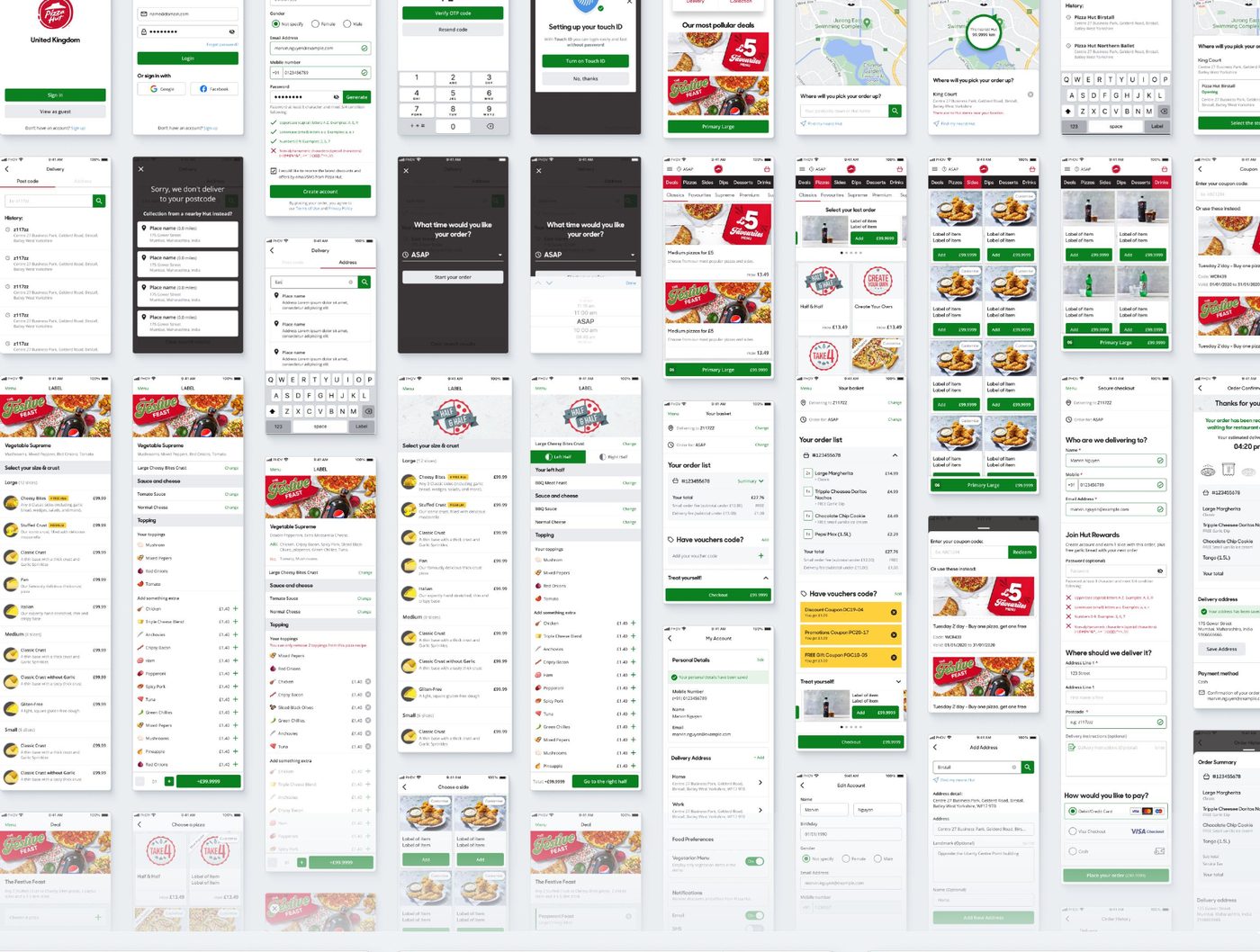
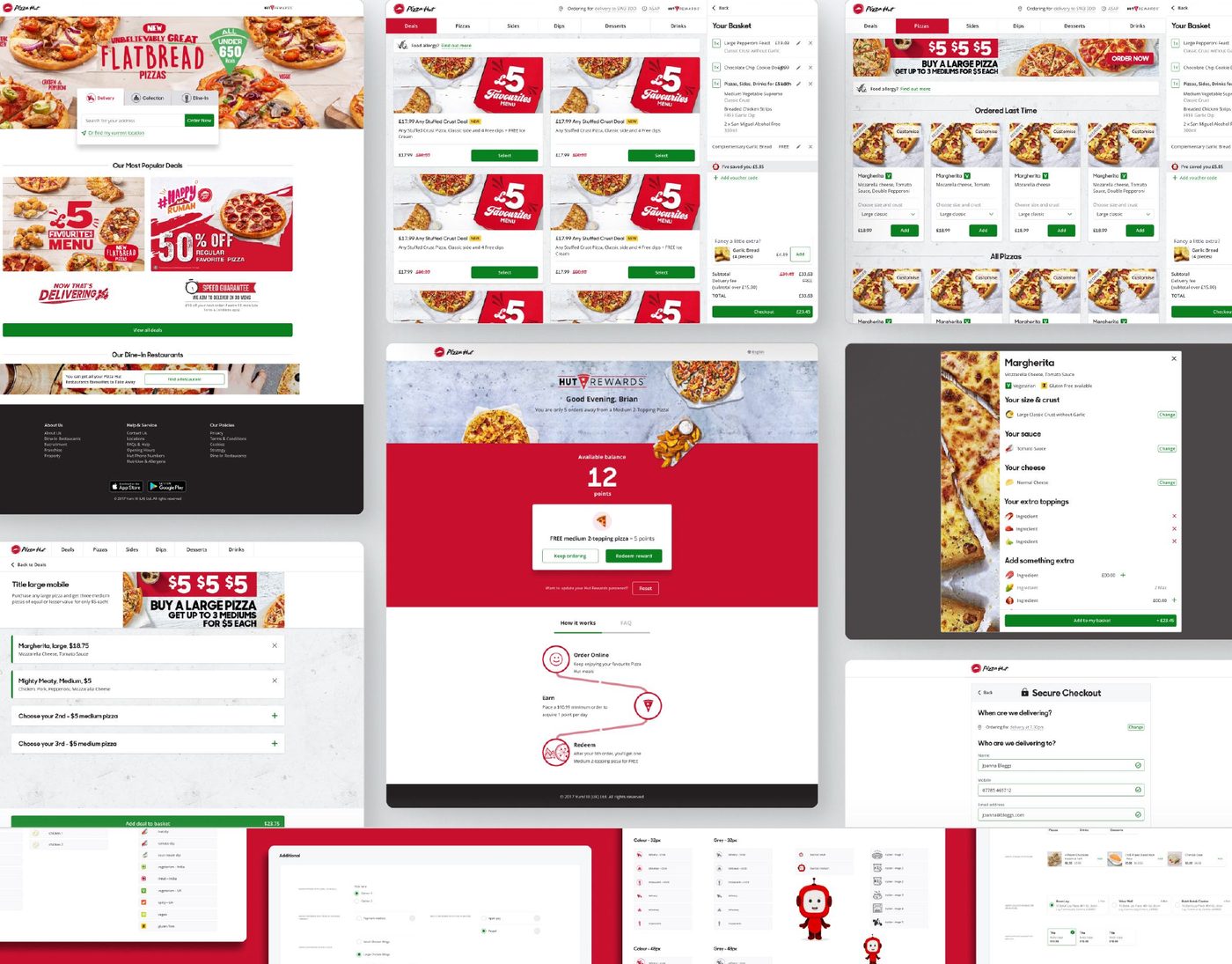
Even when the product is the same, each country brings differences in UX, language, culture, geography and more. When building an e-commerce product, it is critical to think carefully about how best to reach users and encourage them to interact.
UI & Graphic Design · 2016 – 2017
A connected set of restaurant apps for Pizza Hut Indonesia: Kitchen Display, POS, Dine-in and Driver, on tablet and mobile.
A complete system that supports the daily operations of a restaurant chain: Kitchen Display System (KDS), POS, Dine-in App and Driver App, for Pizza Hut in Indonesia. It was designed for tablet and mobile, with responsive layouts and touch-friendly interfaces. I worked with the developers to make sure real-time features and communication between the apps were feasible.
I was the UX/UI designer, working with Product Owner Neeraj Kumar.
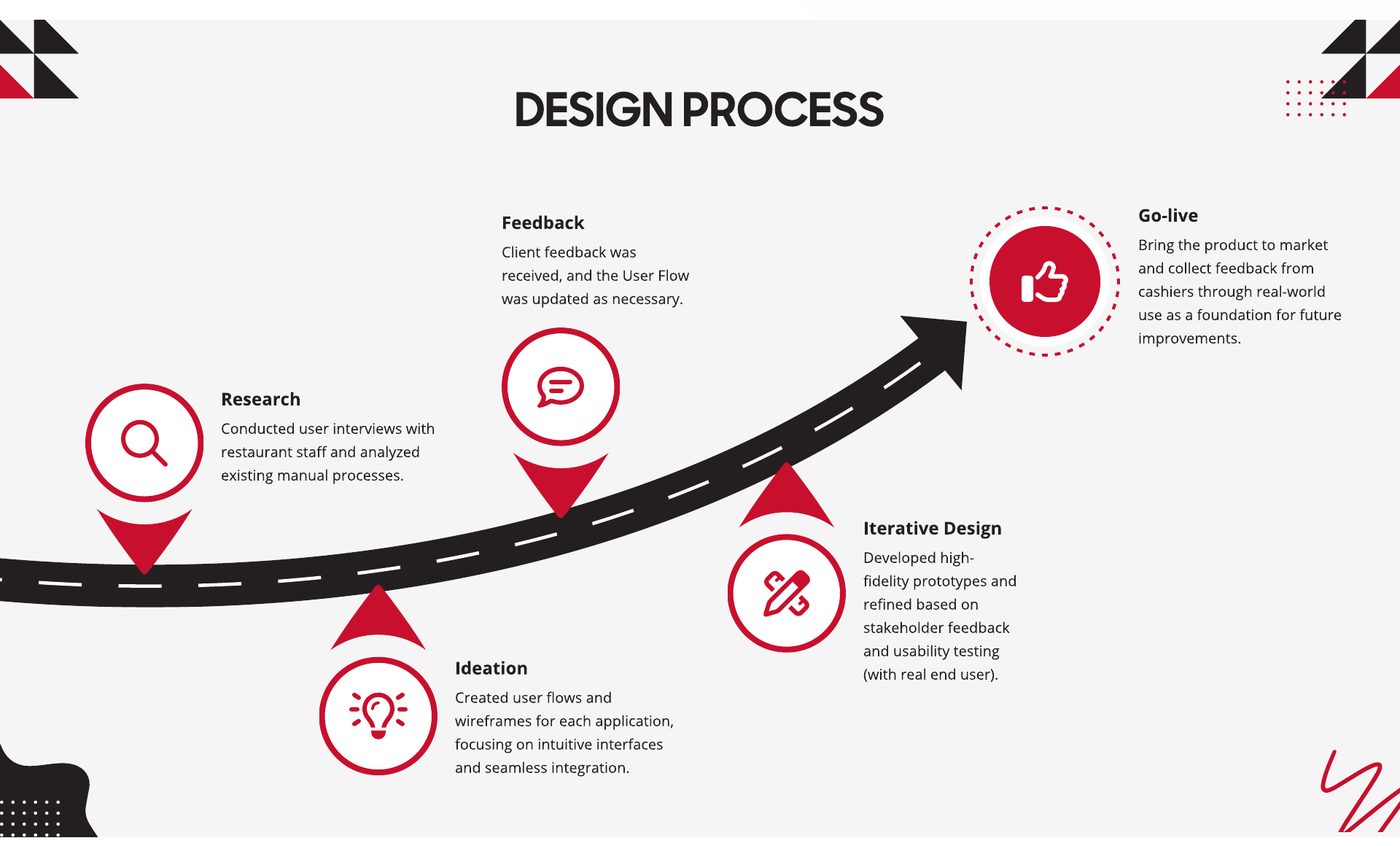
Step 01
Interviewed restaurant staff and analysed the existing manual processes.
Step 02
Created user flows and wireframes for each app, focused on intuitive interfaces and seamless integration.
Step 03
Built high-fidelity prototypes and refined them with stakeholder feedback and usability tests with real end users.
Step 04
Updated the user flows as client feedback came in.
Step 05
Launched the product and collected feedback from cashiers in real use, as a base for future improvements.
Insight 01
Taking orders by hand and talking to the kitchen were slow and error-prone.
Insight 02
One real-time system could greatly improve efficiency and the customer experience.
Insight 03
Each user group (cashiers, kitchen staff, diners, drivers) had its own needs and pain points.
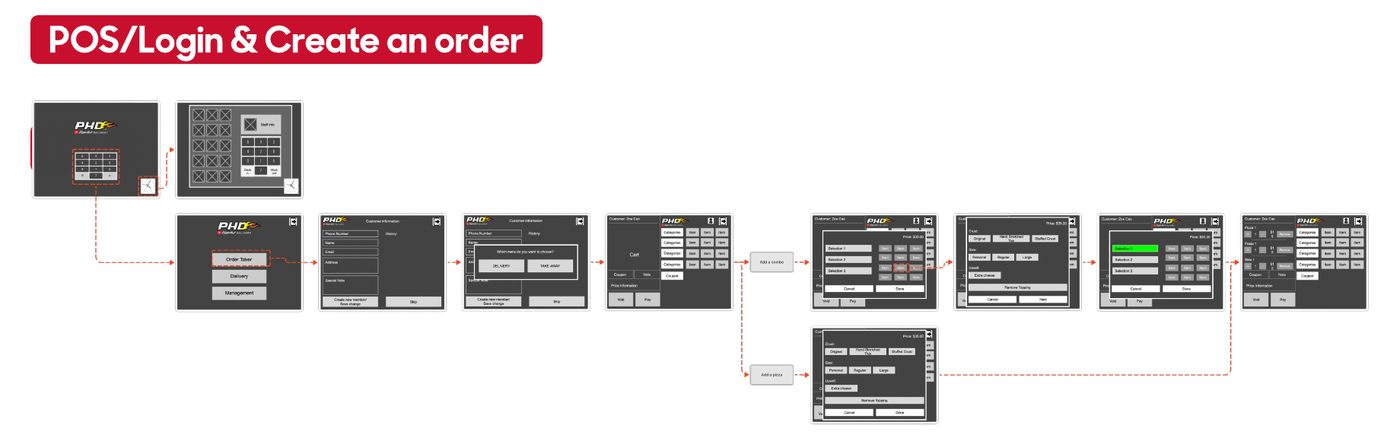
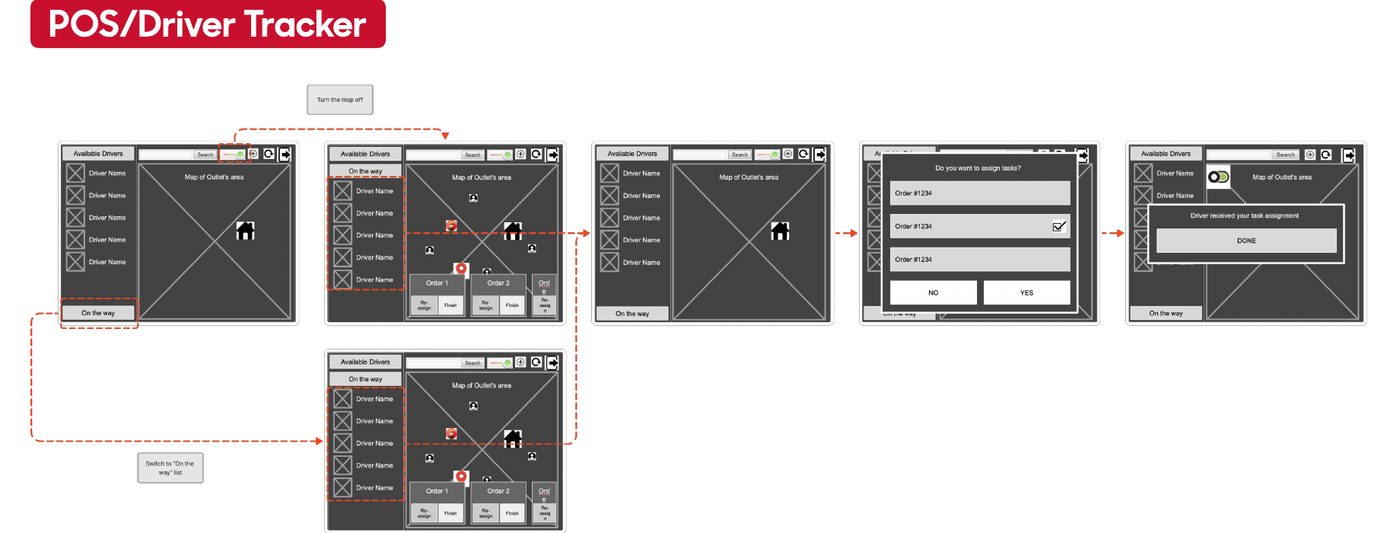
Wireframes for the Indonesian market, starting with the POS.
| Challenge | Solution |
|---|---|
| Designing one cohesive system across many devices (tablets and phones) | A consistent design language across all apps, so each one feels familiar |
| Making interfaces intuitive for users with very different comfort with technology | Simple, task-focused screens with a clear visual hierarchy |
| Keeping every app in sync in real time | Worked with the backend team to make the real-time data flow seamless |
Cashier · 24 · 1 year at Pizza Hut
When a customer asks about their pizza, Kartika has to shout into the kitchen and read out the order number. She keeps tracking the kitchen and talking to drivers about delivery orders all day. Her goals: less unnecessary talking, checking information quickly, and passing it on with one action.
Chef · 32 · 4 years at Pizza Hut Jakarta
Ahmad works under pressure to get every order out on time, with good quality and the right priority. He reads each order from a tiny printed chit and ticks it off by hand. His goals: fewer manual tasks, checking information easily, and marking a dish as done with one tap.
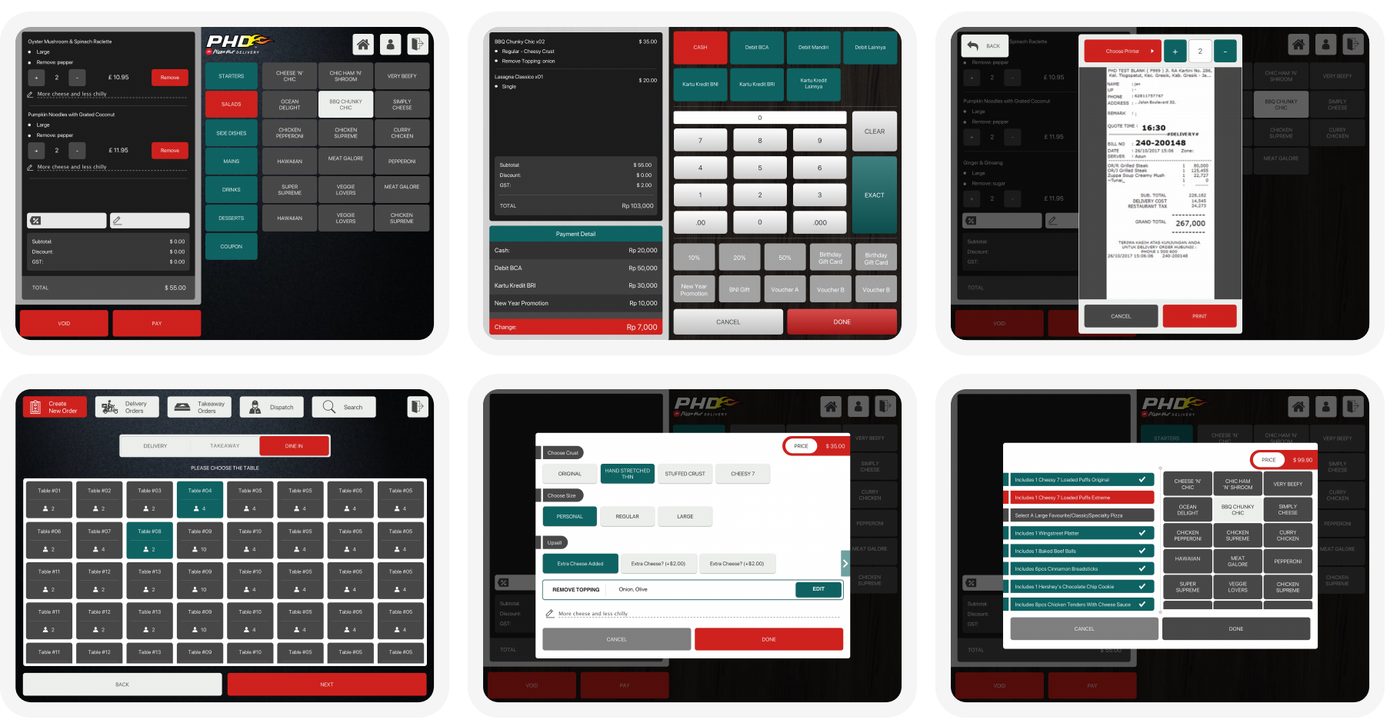
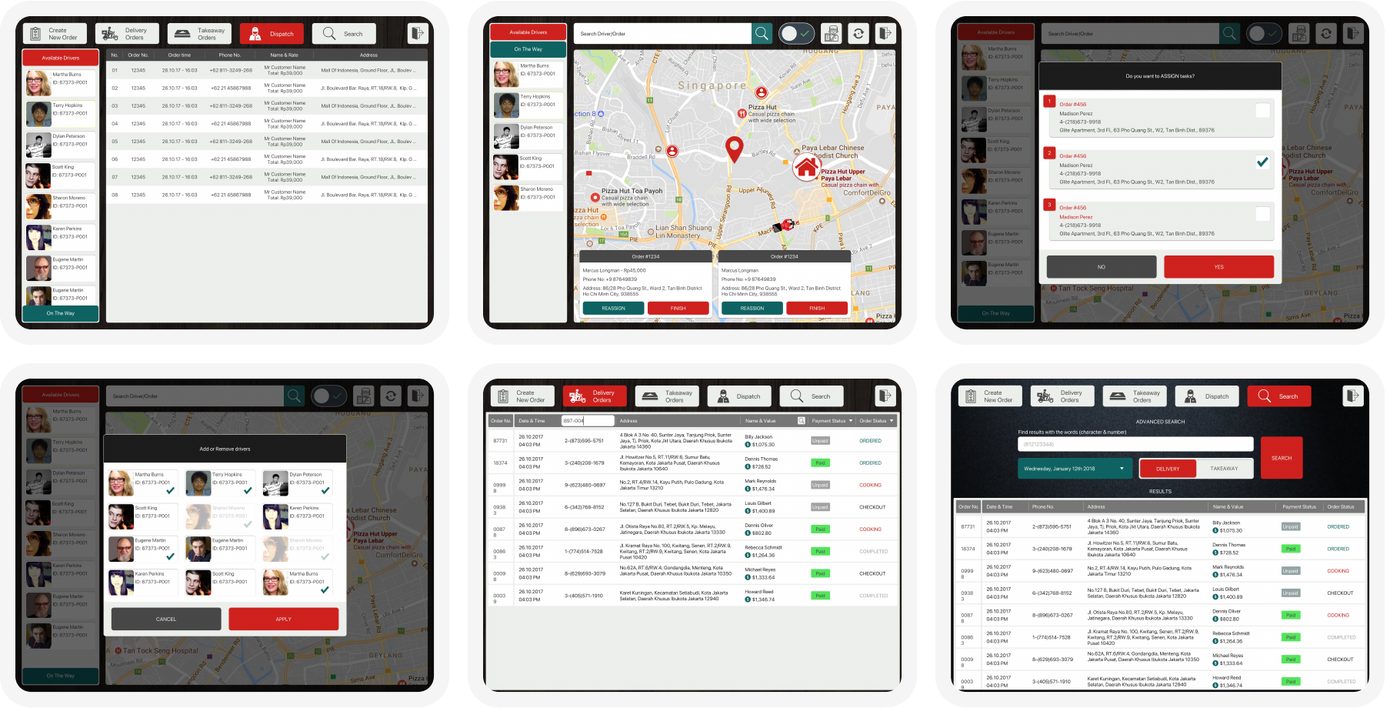
This project tested my ability to build complex, connected systems that balance user needs and business goals. It also showed how much market conditions and company goals shape a product: only the POS and KDS were released. The Driver App and Dine-in App were not built because of budget limits, and another driver app was already launched and more heavily promoted in Indonesia.
About me
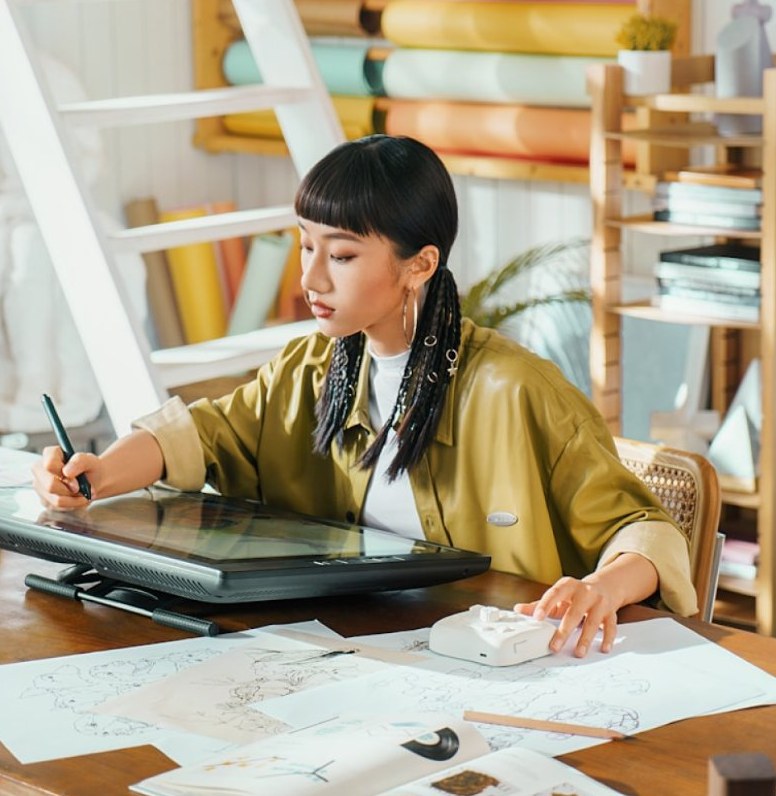
I’m a product designer based in Ho Chi Minh City, with a background in communication design and a deep love for storytelling. Over the past 6 years, I’ve worked with startups and established companies to create digital experiences that feel personal and meaningful.
My approach is rooted in empathy, clarity, and attention to detail. I believe that the best designs are invisible — they guide users naturally, without calling attention to themselves.
When I’m not designing, you’ll find me journaling, photographing quiet moments, or exploring new coffee shops with my sketchbook. I’m always curious about the stories behind everyday objects and the emotions they evoke.
When I have free time, I often come up with ideas for ‘if I’m unemployed in the future’ and explore niche hobbies. I am a mother to a little son, a continuous runner against the waves of change, and a designer who trusts data over assumptions.
How I work
I assume my first read of a problem is incomplete. Before committing to a direction, I look at it from the user’s, the business’s, and the engineer’s seat.
I like to study how people really behave, not how we assume they behave. If I’m asked about a decision, I search for evidence rather than general agreement.
I prefer building a scalable blueprint over patching a single room. Setting up a strong design system and sitemap today means we can launch tomorrow’s features in half the time.
I’m careful before I’m fast. I’d rather ask one more question than ship one wrong assumption. But once the ground is solid, I keep moving.
Experience
Oct 2022Nov 2024
This was the role where I discovered that the most important design work is usually the work nobody sees.
The product had a history of inconsistent decisions throughout the years internally. FCI SmartCloud provides IaaS, PaaS and SaaS services to enterprise clients. Features were constructed in separate groups, components were not shared, and the navigation showed how the product was built, not how people thought about it. It worked on paper. It didn’t feel like one product in practice.
I didn’t start with a redesign. It was an audit, mapping every screen, every flow, every component in the live product before doing anything. From the very beginning of a project, I make sure that every choice is based on what is actually there, not what the documentation says.
Together with SmartCloud, I lead design for Data Suite – an enterprise platform for data-driven decision making. Data products have a specific design risk: everything is important to someone, yet without a clear visual hierarchy and common design language dashboards are noise. I saw the design system as the most important thing I had to achieve. If you can get the visual language for data right once, it will be easier to trust every chart, report, and new feature.
The combination of the two platforms provided me with a unique experience: designing design systems for two different products at the same time, reconciling their restrictions, and shipping work that lasted longer than my time on the team. Now, that’s my standard. Not just to deliver displays, but to leave something for the next person to build on.
Jul 2018Mar 2022
At this point I stopped thinking about screens, and started thinking about systems.
Pizza Hut Digital Ventures was not an agency, but an in-house product team inside one of the world’s top F&B businesses, given the task to design and scale digital solutions throughout Asian regions. The pressure was different, decisions had real effects at scale and “we’ll fix it later” wasn’t an option when a failed order flow impacted thousands of transactions a day.
I focused on the Master App – one ordering system that needs to work in markets with quite different user behaviours. What looks simple on paper becomes really complex when you consider that payment standards, trust in delivery, waiting habits and even screen interaction patterns differ from country to country. I spent as much time understanding those differences as I did designing around them – because a common experience across markets has to be consistent in outcome, not just in visual layout.
This time has made me mindful of two instincts I bring to every project. The first is that user research isn’t a phase you get completed, but a check you run repeatedly, even when you believe you already know the answer. Second is that the best cross-market design isn’t an agreement between local needs, it’s a system flexible enough that every market feels like it was developed just for them.
Apr 2016Jul 2018
My first professional design job – and the one where I learned how to work fast without cutting corners. In an outsource environment supporting numerous F&B clients at once, I learned to context switch rapidly, read client needs on short briefs, and deliver work that stayed up across development, UAT and go-live with no frequent changes.
The main project was the Pizza Hut app suite – POS, KDS, Dine-In and Driver App – built for three separate Asian markets: Indonesia, Malaysia and Singapore. I learned this early on when I was designing for those markets and it’s a habit I keep relying on: don’t expect one user type, don’t assume one context of use.
Working in several domains in a short period of time condensed what would take years into months: I walked away with a cross-industry visual language, a sharp eye for efficient workflows, and a great respect for how design decisions have an impact for engineering and business outcomes.
Jan 2012Feb 2016
Before I built digital things, I designed human experiences. I learned skills in operations, sales & marketing, and training jobs at hotels and resorts in three locations that have shaped how I approach product design today.
Running front-of-house operations was a crash course in reading people – working out what was needed before they asked, smoothing over any problems as they came up, building service flows that could handle the stress. Systems viewpoints from training personnel across locations: a good process needs to be easy enough for anyone to follow, consistent enough that guests feel it everywhere, and flexible enough to handle unexpected situations gracefully.
I learned what motivates different types of people and how to deliver value without overwhelming them from my background in sales and marketing. The same instincts I apply today to information architecture, onboarding flows and user-centred design.
In hospitality I learned quickly that the best experiences are invisible – only when something is wrong do guests notice.
Education
The foundation that taught me to see every communication problem from both sides — the sender’s intent and the receiver’s understanding.
Trained in multi-disciplinary design and production including Graphic & Branding Design, Web Design, Filmmaking & Video Editing, Photography, and 3D Modeling (Autodesk Maya).
Specialized in design systems, comprehensive product design strategy, and UI/UX best practices.
Where I learned to put users first — from conducting research and building wireframes to prototyping and testing designs that solve real problems with empathy and clarity.
Design course
Online classes in color, layout and design — from a first color wheel to grid systems and accessible mobile screens. Every class mixes hands-on practice with real design vocabulary and ends with a small project.
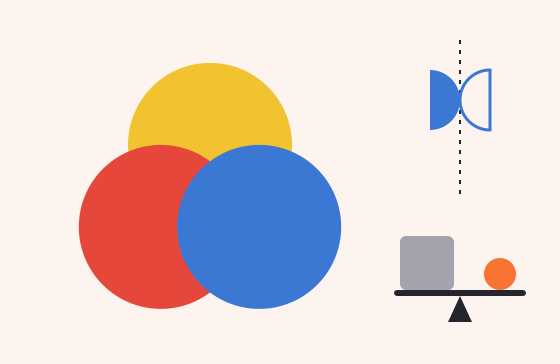
Two levels matched to age. Ages 8–10 mix colors, play with balance and design a poster for an imaginary pet. Ages 11–14 move on to color schemes, hierarchy and the rule of thirds, ending with a movie poster.
View Course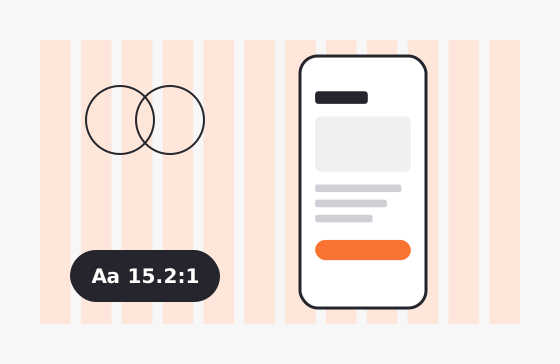
Color psychology, contrast and accessibility, 12-column grids and Gestalt principles — applied to a real UX/UI challenge: designing a mobile app screen.
View CourseHow classes work
Each session runs in three parts: 45 minutes on color, 45 on layout and design, and 30 minutes to put both into one small project.
Students mix, cut, fold, photograph and design. The theory arrives through the activity, not before it.
Every level comes with its own vocabulary list, so students can name what they see — from “warm and cool” to “contrast ratio”.
One session · 120 minutes
Design course · Ages 8–14
Two levels, matched to age, that turn color mixing, balance and layout into things kids can make with their own hands.
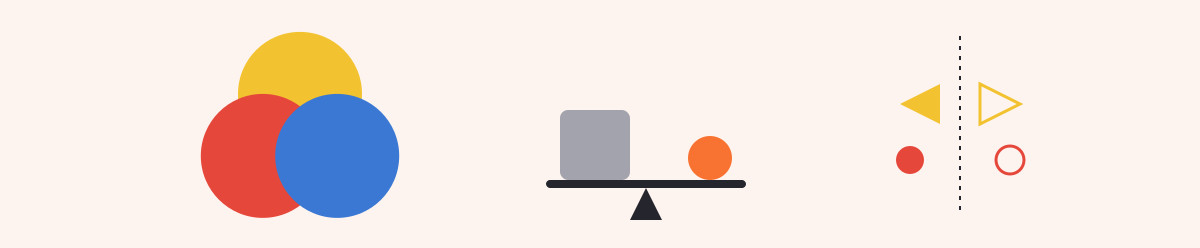
Level 1 builds the foundations: how colors mix, the feelings colors carry, and simple visual balance — all through playful, hands-on activities.
Level 2 brings in real design vocabulary, color schemes and the layout structures — hierarchy and grids — used in digital media every day.
A small, bright shape can balance a large, dull shape. That one idea, discovered with paper and glue, is the start of every layout decision.
Level 1 · Ages 8–10
For children meeting design for the first time. No experience needed — just curiosity and something to paint with.
Level 2 · Ages 11–14
For older kids ready for formal design words and the tools of digital media: palettes, photo grids and simple design apps.
Each level is one 2-hour session in three parts. Choose a level to see its plan.
Level 1 · Ages 8–10
Discover color mixing, the feelings colors carry and simple visual balance through play.
One session · 120 minutes
Color palette
45 minYou’ll learn to
Activities
Layout & design
45 minYou’ll learn to
Activities
Application
30 minYou’ll learn to
Activities
Level 2 · Ages 11–14
Learn formal design vocabulary, basic color schemes and the layout structures used in digital media.
One session · 120 minutes
Color palette
45 minYou’ll learn to
Activities
Layout & design
45 minYou’ll learn to
Activities
Application
30 minYou’ll learn to
Activities
Classes are online, so a few simple supplies at home make the activities work.
Level 1
Paint or play-dough in red, yellow and blue · paintbrushes · paper and large drawing paper · color pencils, markers, crayons · colored paper, glue stick, scissors.
Level 2
A computer or tablet with internet · a phone or tablet camera with a grid overlay · drawing paper and a ruler · optional: Canva or Figma.
Tell me your child’s age and I’ll suggest the right level.
Design course · Ages 15–Adult
The standards working designers rely on — color psychology, accessibility, grids and Gestalt — applied to a real UX/UI problem.
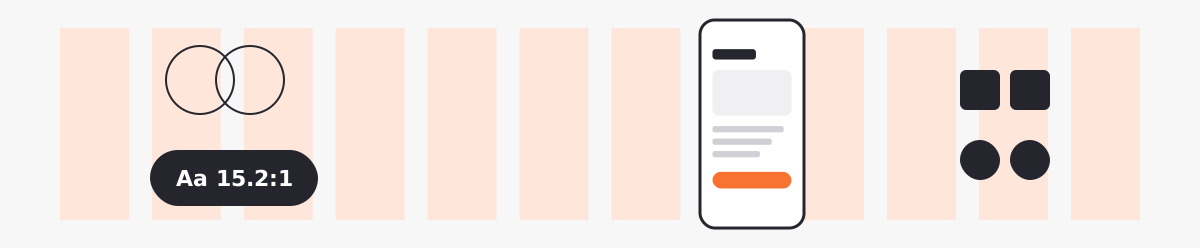
This course explores professional design standards: grid systems, color psychology and accessibility, and how to use design theory to solve complex communication problems.
Everything leads to one practical outcome — a single mobile app screen where every choice of color, alignment and emphasis has a reason.
Good-looking isn’t the goal. A screen where the palette fits the brand, everything sits on the grid, and the eye lands on the main action — that’s the goal.
Teenagers from 15 and adults who want the professional side of design — the reasons behind grids, color and contrast — and want to use them on real interfaces.
One 2-hour session in three parts.
One session · 120 minutes
Color palette
45 minYou’ll learn to
Activities
Layout & design
45 minYou’ll learn to
Activities
Application
30 minYou’ll learn to
Activities
A computer with Figma (free plan is fine), Sketch or InDesign, an online contrast checker, and graph paper if you like to sketch first.
Send me a note about your background and what you’d like to design.
Design Diary
Short notes on product design, painting, crochet and the animals I live with.
The longer I work in design, the more I believe that good design begins with paying attention to people.
Read entryMy favorite things are not always the things I finish quickly.
Read entryAs designers, we often talk about color through systems: primary and secondary palettes, semantic colors, contrast ratios, and accessibility guidelines.
Read entryThere is a particular kind of patience that crochet teaches you. When a stitch goes wrong, you can pretend not to notice and keep going.
Read entryIf animals could review our interfaces, I wonder what they would say.
Read entryOne of the hardest lessons in product design is learning that more features do not automatically create more value.
Read entryPainting has taught me to look at ordinary things a little longer.
Read entryWhen we talk about user experience, we often discuss flows, usability, accessibility, and conversion rates. These things matter, of course.
Read entryThere is something comforting about crochet that I cannot quite explain.
Read entryI used to think a good design was one where every detail had a purpose, every space was filled, and every interaction had something interesting to offer.
Read entryDesign Diary · No. 01
I used to think a good design was one where every detail had a purpose, every space was filled, and every interaction had something interesting to offer. Over time, I began to appreciate the opposite: sometimes, the best thing I can do for a design is to leave something out.
White space gives content room to breathe. A quiet interface lets people focus on what matters instead of asking them to process everything at once. I think of it as being a thoughtful host — making people feel comfortable without constantly trying to get their attention.
These days, I try to ask myself one simple question before adding anything new: Does this make the experience better, or does it simply make the screen busier?
Design Diary · No. 02
There is something comforting about crochet that I cannot quite explain. A ball of yarn, a hook, and a pattern are all I need to turn an ordinary evening into something slower.
Unlike my work as a UI/UX designer, there is no stakeholder waiting for a prototype and no deadline asking me to revise a button. I can unravel an entire row simply because it does not feel right. I can start over without writing a single explanation.
Perhaps that is why I love making things with my hands. It reminds me that not everything needs to be optimized. Some things are worth doing simply because the process makes us happy.
Design Diary · No. 03
When we talk about user experience, we often discuss flows, usability, accessibility, and conversion rates. These things matter, of course. But I believe the emotional side of an experience often lives in much smaller details.
Think about a form that remembers your previous choices, an error message that explains how to fix a problem, or a confirmation screen that tells you exactly what will happen next. None of these features needs to look impressive. They simply make people feel less lost.
For me, good UX is not about making users admire the interface. It is about helping them feel capable while using it. The best experience might be the one they barely notice — because everything works as they expected.
Design Diary · No. 04
Painting has taught me to look at ordinary things a little longer. The shadow beneath a cup, the uneven edge of a leaf, the way afternoon light changes the color of a wall — details I might have overlooked suddenly become interesting.
I find this habit surprisingly useful in design. Before deciding how something should look, I try to understand what I am actually seeing. Which part attracts attention first? What creates the feeling of balance? What happens when one color becomes a little quieter?
Painting and interface design use different tools, but both ask me to make choices about color, composition, contrast, and focus. More importantly, both remind me that observation comes before creation.
Design Diary · No. 05
One of the hardest lessons in product design is learning that more features do not automatically create more value.
A product team may ask for another filter, another shortcut, or another section on an already crowded page. Each request might make sense on its own. But when everything becomes a priority, the experience can become harder to understand.
I have learned to step back and ask three questions: What problem are we solving? Who experiences this problem? And is there a simpler way to solve it?
Constraints can be uncomfortable, especially when a layout has limited space or a requirement seems impossible to avoid. But constraints can also encourage better thinking. Sometimes, the most meaningful design decision is not what we introduce — it is what we choose to leave behind.
Design Diary · No. 06
If animals could review our interfaces, I wonder what they would say.
Perhaps they would ask why a button is so small, why the important thing is hidden behind three menus, or why a simple action requires so many steps. They would probably care very little about our beautiful gradients and carefully chosen typefaces.
Animals have a wonderful way of reminding us to pay attention to immediate needs. Is the food easy to reach? Is the resting place comfortable? Can they explore without feeling trapped?
I think there is a small UX lesson here: before making something impressive, make sure it works for the one who needs it. Whether designing for people or caring for animals, empathy begins when we stop assuming that everyone experiences the world the same way we do.
Design Diary · No. 07
There is a particular kind of patience that crochet teaches you. When a stitch goes wrong, you can pretend not to notice and keep going. But sooner or later, the mistake finds its way into the shape of the finished piece.
So you stop. You look at your work. And sometimes, you unravel several rows to correct one small detail.
I used to see starting over as wasted effort. Now, I think of it as part of making something with care. In design, too, the first version is rarely the final one. Research changes our assumptions. Testing reveals unexpected problems. Feedback gives us a reason to reconsider.
The trick is not to avoid mistakes. It is to notice them early enough, understand why they happened, and have the patience to make things better.
Design Diary · No. 08
As designers, we often talk about color through systems: primary and secondary palettes, semantic colors, contrast ratios, and accessibility guidelines. These foundations are essential, but my personal relationship with color begins somewhere less technical.
It begins with the soft green of a plant near my window, the warm cream of a favorite yarn, or the dusty pink that appears in a painting when I mix two colors without expecting much.
Colors carry associations, but those associations are not universal. A color that feels calm to one person may feel cold to another. Culture, memory, context, and neighboring colors all influence how we perceive it.
That is why I enjoy exploring color before assigning it a role. Sometimes, a palette begins not with a brand guideline, but with a feeling I want someone to experience.
Design Diary · No. 09
My favorite things are not always the things I finish quickly. Sometimes, they are the small projects that stay beside me for weeks: a crochet piece waiting for its final row, a painting that needs one more layer, or an idea for a personal project that I am not ready to share yet.
I like having hobbies that do not need to become anything bigger. Not every drawing has to become a print. Not every handmade object needs to become a product. Not every idea needs to turn into a portfolio case study.
As a designer, I spend a lot of time thinking about outcomes. These little projects remind me to enjoy the space between beginning and finishing — the imperfect, unfinished part where curiosity still has room to grow.
Design Diary · No. 10
The longer I work in design, the more I believe that good design begins with paying attention to people.
Not just the users described in research documents, but the real people behind those descriptions. The person who is tired after a long day. Someone who is unfamiliar with technology. A customer who is worried about making a mistake. A colleague who is trying to explain a complicated requirement.
Kindness in design is not about making every screen soft or every message cheerful. Sometimes, it means giving clear instructions. Sometimes, it means allowing people to correct an error without starting over. Sometimes, it means protecting their time by removing an unnecessary step.
I want to keep learning the technical side of my craft, but I also want to remember why I do it. The goal is not simply to make digital products look better. It is to make everyday interactions a little easier, clearer, and more considerate.
Perhaps that is the kind of designer I want to become: someone who pays attention, asks better questions, and leaves people with a little less frustration than they came with.
Let’s talk
You’re building something that needs someone careful with the details and curious about the data — I’d like to hear about it.
I turn complex system challenges into intuitive user journeys — combining UX research and visual design to build scalable systems that save development time.
or you can contact me directly via bear12689@gmail.com